Originally published November 2014. Updated January 2026 with a decade of further decline, consolidation and the rise of independent journalism sites.
A decade on there are even fewer voices
When this was first written in 2014, New Zealand technology journalism was in its “twilight years.” By 2026, it would be generous to call it even that. The situation has deteriorated further:
IDG’s titles: Computerworld NZ and **Reseller News **are now run from Australia. There is local input, Reseller News has a New Zealand editor, but both titles include much Australian content. TechDay continues but with reduced scope and it is still primarily a marketing operation, not journalism in the sense we grew up with.
Many of the journalists named in 2014 have moved on to other roles or overseas publications. The mainstream newspapers have cut back even further.
What technology coverage exists is often outsourced, aggregated or, in the worst cases, AI-generated filler.
There is bright spot with independent journalists using platforms like Substack, Ghost and personal websites to partially fill the void. But these voices serve niche audiences rather than providing the broad industry coverage New Zealand once had. And none of them other than this site are technology focused.
You can count the number of full-time technology journalists writing for New Zealand audiences on your fingers. Experienced local journalists are as likely to turn up on overseas publications as on local titles.
Readers are more familiar with international technology media; even if it doesn’t always serve our needs.
It means we no longer tell the best stories about local technology companies. We don’t report the ways New Zealanders deal with technology. A lot gets missed.
We’ve stopped telling our stories because no-one wants to pay for that kind of writing.
Specialist tech publishers
Three specialist publishers dominate:
Techday publishes two monthly print magazines: IT Brief and The Channel. It operates as an umbrella website featuring eight virtual publication brands covering subject niches.
Techday lists three staff journalists are listed on its website. The last time I asked none of them worked full-time. This may have changed. Update: Techday Publisher Sean Mitchell tells me his journalists are all employed full-time.
IDG is US-owned and Australian managed. It publishes a print edition of CIO magazine three times a year. If you want a subscription you have to apply to Australia. That speaks volumes. IDG also operates Computerworld, NZ Reseller News and PC World as online-only publications.
IDG employs two full-time journalists. James Henderson is the editor of Computerworld NZ while Divina Paredes is CIO editor. Randal Jackson writes stories as the group’s Wellington-based freelance. Reseller News and PC World don’t have local editorial staff. Update: James Henderson is the editor of both Computerworld NZ and Reseller News.
**iStart **publishes a print and electronic magazine three times a year. The business is Auckland based with New Zealand and Australian print editions and websites. Auckland-based Clare Coulson is the editor.
Part-time technology journalism
Between them the three specialist publishers employ three full-time and four part-time journalists. Update: six full-time and one part-time. That’s still fewer than one journalist per masthead. They rarely break hard news stories. News pages are mostly filled with rewritten press releases and PR-fed material.
That sounds like criticism. On one level it is, but it also reflects commercial reality. There’s little advertising revenue, and ad-blocking has made the situation worse. What advertisers the publishers can scrape up are looking for a shortcut to sales leads, not hard-hitting exposés.
You will find longer features in most titles. Sometimes there’s even analysis although there’s little of the deeper material that characterised the technology press in the past.
Again that’s commercial reality: journalists are under pressure to pump out a lot of content fast. There’s not much time for reflection.
This also explains why the IDG sites are full of overseas filler material. It keeps the pipeline full at no extra cost to the publisher. The stories seem to be picked at random. No thought is given to whether a story serves readers.
This can get extreme. Last week Ian Apperley noted there wasn’t a single local story among the 100 most recent news items on the Computerworld NZ feed.
Technology journalism in mainstream media
The same pressure to pump out volume applies to tech journalists working in New Zealand’s mainstream media. Both Stuff and the NZ Herald fill their online pipelines with low-cost, low-value overseas filler material.
In the past the newspapers did great work keeping industry insiders, users and the public informed about events and trends. Now they publish shorter, less analytical news although there are some notable exceptions, particularly when covering telecommunications.
One reason you don’t see as much local technology news is there are no longer any full-time technology journalists working on mainstream newspapers and magazines.
Chris Keall who at one time edited NZ PC World is the most notable specialist journalist in terms of output. He is NBR technology editor. Keall is also the paper’s head of digital, so he spends less time at the tech coal face. Keall manages to write roughly a story a day and at times gets behind more complex issues.
At the Dominion Post Tom Pullar-Strecker was a technology specialist but now has a general business journalism role. Being based in Wellington he sometimes gets insight into issues such as telecommunications policy. These days he writes roughly one tech story a week.
NZ Herald
The NZ Herald gives technology assignments to a number of journalists. The best know is Chris Barton, who writes features and commentary covering technology and telecommunications topics. Barton goes deep, but his work only appears occasionally.
The Herald also runs a weekly blog by tech veteran Juha Saarinen. Saarinen is one of the locally based technology journalists who appears to earn most of his income from working for overseas publishers. Unlike most of us, he has a firmer technology background. He mainly writes for IT News, an Australian online publication.
Rob O’Neill is another virtual ex-pat New Zealand journalist. He writes for ZDNet and is listed as part of the ZDNet Australia team. O’Neill writes local and international stories, maybe two local items a week.
Wellington-based Owen Williams has only recently moved to working full-time as a journalist. He is now on the team for US-based The Next Web.
On a personal note
This round-up wouldn’t be complete without mentioning my work.
I’m a freelance journalist. I write a regular technology column for NZ Business magazine — it mainly appears in print. In the last year have also written features for iStart, NBR and for Management magazine, which is now part of NZ Business. I also turn up on TV3 Firstline and the NZ Tech Podcast talking about technology.
My highest profile freelance work would be on the business feature pull-outs that appear in the NZ Herald about ten times a year. Although I get to write about tech from a business point of view, the stories range across most business areas.
There are also overseas jobs. In the last year I have written for ZDNet’s PC Magazine and for Computer Weekly out of the UK. Both publishers commissioned stories that are specifically about New Zealand themes.
Local technology journalism is undergunned
Most experienced New Zealand technology writers, myself included, are not writing full-time for New Zealand audiences about local themes. Some are writing for overseas publishers, others split writing duties with other editorial responsibilities.
Those who are writing full-time spend their lives in a haze churning out short items dictated largely by the flow of press releases and PR-initiated pitches.
Too often an exclusive is nothing more than first dibs on a press release. You’re not doing your job when you post 20 smartphone shots of someone’s new data centre or are the first New Zealand site to publish alleged leaked photos of a yet to be launched product.
Getting eyeballs is everything. Local publishers fight with Google over the slim pickings available from online advertisements. They also compete internationally. New Zealanders probably read more overseas written tech news than locally written stories.
I’m not judgemental about the problems they face or the way local publishers tackle the problems, I’m on the receiving end of the same economic forces.
I’m not judgemental about the problems they face or the way local publishers tackle the problems, I’m on the receiving end of the same economic forces. The subscription economy hasn’t solved the problem and paywalls remain controversial.
Who pays the piper?
The market doesn’t serve the readers. It doesn’t serve the local tech industry. Leaders of New Zealand tech companies need to be aware of what is going on in their industry, not what someone’s promotional output says. They need intelligence, not propaganda.
The current approach doesn’t serve the public good.
There’s also a problem when a big news story breaks that has technology woven into its fabric. Remember the fuss in the run-up to the 2014 election over stolen emails? Perhaps the planned $1.5 billion reboot of the IRD computer system. How about the business of the Edward Snowden leaks?
In some cases journalists who don’t have tech expertise or the contacts needed to make sense of what is happening are sent to deal with these stories.
That’s a pity. There’s a bigger pity. Hundreds of real, hard news stories, things that the public needs to know about go unreported because they are not part of a public relations campaign. Or worse, public relations managers block the news from getting out.
And much of what passes as news is actually PR campaigns dressed up as research.
Oxygen
Let’s put aside the worthy goal of keeping the public informed and get to a different commercial reality. New Zealand’s homegrown technology sector doesn’t get the media oxygen it needs to breathe. Individual journalists have learned they must build their own platforms and audiences, but this creates a fragmented landscape rather than comprehensive industry coverage.
Because overseas news feeds dominate the agenda in New Zealand, people buying here are more likely to hear about an overseas supplier than a local one. Investors will put their money overseas, skilled workers will look for jobs overseas. This is already causing problems.
The lack of balanced, impartial and thoughtful New Zealand technology journalism creates the impression there’s not much going on here.
Blogs take up some of the slack. So does Mauricio Freitas’ Geekzone website and projects like the New Zealand Tech Podcast.
Technology needs a local voice. It has to be an honest voice. That means turning over rocks some people would prefer stayed untouched.
What comes next?
Technology journalism won’t disappear entirely, but it has fundamentally changed. The model of specialised technology publications employing teams of journalists to cover a local market comprehensively is dead—at least in a market the size of New Zealand.
What survives are:
**Independent voices: **Journalists like myself who maintain their own platforms and patch together income from multiple sources.
Niche coverage: Specialist reporters focusing on telecommunications, cybersecurity or other specific sectors.
Occasional depth: Mainstream journalists who dive into technology topics when major stories break
Community efforts: Podcasts, newsletters and news services like Geekzone that are built by enthusiasts.
The question isn’t whether this is better or worse than 2014—it’s simply what exists. The business model challenges that drove the decline haven’t been solved; they’ve forced adaptation.
For New Zealand’s technology sector, this means companies must work harder to tell their stories. For readers, it means seeking out multiple sources rather than relying on a single comprehensive publication. For journalists, it means building direct relationships with audiences rather than depending on institutional employers.
**More on journalism and media:
**
_This post is part of ongoing coverage about journalism business models, digital adaptation and the state of technology journalism: _
Rupert Murdoch once called the iPad a saviour of newspapers. The reality was smaller savings, fewer readers and little relief for publishers.
This post was originally published in April 2010, days after the first iPad launched. Updated January 2026 with fifteen years of hindsight on how the tablet revolution reshaped—but didn’t save—news media.
Rupert Murdoch described Apple’s iPad as a “potential saviour of newspapers” not long after the tablet computer first appeared. At the time, his optimism was misplaced. Both the numbers and the economics showed otherwise.
Small savings, big costs remain
Moving to the iPad saves publishers money on paper, printing, wrapping and distribution. Yet Apple’s 30 percent cut of subscription revenue is roughly the same as the margin taken by newsagents and other retailers. Editorial costs don’t go away, so the overall savings are relatively small.
More importantly, fewer readers are willing to pay for digital subscriptions than for printed copies. Evidence in 2010 suggested only five percent of readers would pay. Even if that number had climbed to 25 percent, copy sales revenue would still fall.
Fewer readers means less advertising
Print newspapers also enjoy a secondary audience. A copy bought in a shop is often passed from reader to reader. Digital editions make sharing harder because of copy protection. That reduces the number of readers per subscription and in turn makes advertising less valuable.
True, digital readers are more identifiable, which improves targeting. But advertisers ultimately want reach: fewer readers meant less ad revenue overall.
Analysts warn of limits
Ovum, a technology analyst firm, reached the same conclusion. In a May 2010 report, principal analyst Adrian Drury wrote: “Apple’s much-hyped tablet device alone will fail to secure the future of news and magazine publishing.”
He argued that while the iPad offered publishers new distribution channels, it was still just one device. Sales volumes would take time to build, while the challenge of finding a sustainable business model for publishing was immediate. Ovum also predicted the iPad media market would quickly become congested.
A turning point, not a saviour
Apple forecast it would sell 13.2 million iPads by the end of 2011. That compares with 25 million iPhones shipped in 2009 alone. While the iPad and later tablets reshaped media, they were never the cure for declining newspaper fortunes Murdoch and others hoped for.
Fifteen years later: What actually happened
The prediction proved accurate. The iPad didn’t save newspapers, though tablets have reshaped how people consume news.
By 2026, newspaper print circulation has collapsed to a fraction of 2010 levels. The iPad’s failure wasn’t about the device—it was about the business model. Publishers eventually learned that how they frame digital subscriptions matters more than the delivery mechanism.
What actually saved some news organisations wasn’t a technology but direct reader relationships. Email newsletters, podcasts and reader-supported journalism have all succeeded where app-based distribution failed. Journalists who learned to use their core skills in new ways thrived, even as their erstwhile employers struggled.
The iPad became ubiquitous—Apple sold over 500 million iPads in the fifteen years since Murdoch’s prediction. But news apps didn’t become the dominant way people consume journalism. Instead, social media, web browsers and direct subscriptions won out.
Meanwhile, the cost-cutting that seemed attractive about digital distribution—no printing, paper or physical distribution costs—accelerated newsroom layoffs. The savings went to shareholders, not journalism. As predicted, newspapers missed crucial opportunities to adapt their business models when they had the chance.
**More on journalism and media: **
This post is part of ongoing coverage about journalism business models, digital adaptation and modern reporting:
On the fifth anniversary of Windows 10, we look back at what it was supposed to be and what it ultimately became. Almost nothing turned out as planned, and that’s OK.
I celebrated the occasion by upgrading a small data centre’s worth of Windows 10 devices to the new build and monitoring for glitches. This year, the process was refreshingly uneventful and almost shockingly fast. On newer PCs, almost everything happened in the background, and the wait after the final reboot was typically five minutes or less.
Five minutes seems incredible. There were early iterations of Windows 10 where you might need to set aside the best part of the day for an upgrade.
That was for the essential pre-upgrade back-up along with an hour or so for the upgrade itself. On top of that was time needed to familiarise yourself with the new reality.
Often things would go missing. In some cases key features would be dropped or change beyond recognition.
One lesson at that time was to never automate or customise Windows 10 because you’d never know if an update would break everything.
There were also times when an automatic upgrade might happen without warning and you’d wake up in unfamiliar territory.
It’s not clear to me how long it took Microsoft to get Windows 10 to the point where upgrading stopped being a risky venture.
Microsoft’s cunning plan
Ed Bott:
Back in 2015, Microsoft’s vision for Windows 10 was expansive. It would run on a dizzying assortment of devices: smartphones running Windows Mobile, small tablets like the 8-inch Dell Venue 8 Pro 5000 series, PCs in traditional and shape-shifting configurations, Xbox consoles, the gargantuan conference-room-sized Surface Hub, and the HoloLens virtual reality headset.
In 2020, that vision has been scaled back. Windows 10 Mobile is officially defunct, and small Windows 10 tablets have completely disappeared from the market. Of all those chips scattered across the craps table, only the 2-in-1 Windows device category appears to have paid off.
There was a time when Windows Mobile, or Windows Phone as it was called, beat the pants off Android and gave iOS a run for its money. Windows Phone 7 was great. It integrated neatly with everything else Windows and Office. For a while the Windows desktop and mobile combination was the most productive option.
Microsoft, being Microsoft, couldn’t resist tinkering with great, making life more complicated. Let’s face it, too complicated.
Windows Phone 8 may have had better features, but it was already on the path to clumsy and cluttered. From that point things kept getting worse.
Of course the real killer was that mighty Microsoft, once the world’s largest company and still among the biggest, couldn’t assemble a credible suite of phone apps.
Microsoft would have done better spending more of its capital seeding phone app developers than on other failed investments. Or maybe it was always a lost cause. It doesn’t matter because a reinvented Microsoft went on to greater things with Azure and enterprise products and services.
There are times when 2-in-1 Windows devices sparkle and shine, but for the most part non-Surface Windows PC hardware feels almost held back by Microsoft.
HP, Dell and others give every appearance of being capable of making great hardware. Yet they never quite reach the lofty heights. Ever so often something special appears, but you have to move fast and buy it at the time because the good stuff never gains traction.
Likewise Microsoft’s own-brand Surface products don’t always hit the target. There have been missed. Yet on the whole the Surface experience is fine even if product reliability isn’t up to scratch. And if you want to spend that much money, Apple can look relatively inexpensive by comparison.
On conspiracy theories
More Bott:
And then there were the dark scenarios that Microsoft skeptics spun out around the time of Windows 10’s debut.
The free upgrade offer was a trap, they insisted. After Microsoft had lured in a few hundred million suckers with that offer, they were going to start charging for subscriptions. Five years later, that still hasn’t happened. If Microsoft is running some sort of hustle here, it’s a very long con.
There’s more conspiracy coverage in the original story. As Bott says, it is all nonsense. The conspiracy theories looked daft at the time. They showed a lack of understanding about Microsoft’s direction and where Windows 10 fits in the big picture.
Windows 10 did the job it needed to do
As Bott puts it:
Despite the occasional twists and turns that Windows 10 has taken in the past five years, it has accomplished its two overarching goals.
First, it erased the memory of Windows 8 and its confusing interface. For the overwhelming majority of Microsoft’s customers who decided to skip Windows 8 and stick with Windows 7, the transition was reasonably smooth. Even the naming decision, to skip Windows 9 and go straight to 10 was, in hindsight, pretty smart.
Second, it offered an upgrade path to customers who were still deploying Windows 7 in businesses. That alternative became extremely important when we zoomed past the official end-of-support date for Windows 7 in January 2020.
It’s taken Microsoft eight years to recover from Windows 8. In some ways it still hasn’t fully recovered. It may never recover. Windows 8 was the point where Microsoft no longer dominated.
Yes, things happened elsewhere. There was a switch from PCs to phones. But the key point is that when Microsoft faced the first serious competition to its dominance, it released a terrible operating system. Or at least the wrong operating system to meet the challenge.
Windows 10 didn’t halt Microsoft’s OS decline
If anything Windows 8 accelerated Microsoft’s OS decline.
Stockholm syndrome means that many Windows fans couldn’t see how awful Windows 8 was. Switching from 7 to 8 was a horrible experience. People who could put off those upgrades and stayed with 7. Today about 20 percent of all OS users still have Windows 7, an operating system that is well past its sell by date. Microsoft no longer supports 7.
Other users switched to Apple, Linux or even ChromeOS. And there was a huge switch away from computers to phones.
Before Windows 8 Microsoft’s OS market share was around 90 percent. Today it is about 35 percent and comes in behind Android. Apple is about 8.5 percent.
Windows 10 offers a credible path for Windows 7 users. The fact that so many users, especially enterprise users, have stuck with 7 tells you how bad things were for Microsoft.
To a degree Microsoft has lost interest in Windows. It no longer makes rivers of gold from the operating system. At least not directly. It remains important as a gateway for business users to move to the company’s Azure cloud services. But the days when Windows called the shots are over.
To a degree none of this would have been much of an issue before half the world started working from home on their laptops. For most people video conferencing was something of a nice-to-have after thought until now.
Suddenly we all notice the poor picture quality. What makes this worse is we now have much more bandwidth, so the internet connection is no longer the limiting factor. We also tend to have much higher resolution screens, so camera flaws are more noticeable.
Opportunity for better webcams
There is a huge opportunity for the first laptop maker to get this right. Apple is the most likely candidate here. It’s noticeable how much better the front facing camera is on a iPad Pro when compared with, say, the MacBook Air.
The 2020 12.9-inch iPad Pro has a seven megapixel front facing camera with all the trimmings. It handles 1080p video at up to 60 frames per second. In contrast, the 2020 MacBook Air camera is only 720p.
No doubt there is room for improvement now the laptop camera specification matters in ways it didn’t.
The most curious thing about Stern’s video story is that Apple put a better camera on MacBooks ten years ago. Of course they weren’t as thin then.
Of course there is a trade off between thin and camera performance. Laptop lids are thinner than phones or iPads. Apple’s obsession with thin meant laptop keyboard problems until recently. Now it has to rethink where cameras fit in this.
During the lockdown sales of devices like large screens and printers took off, but there was little interest in standalone webcams. People assume the laptop ones are going to do the job.
This post from 2020 looks at criticism of the iPad. It took another four years for the noise to subside and it still hasn’t entirely gone away.
Last week was the iPad’s tenth birthday. An elite group of Apple fans celebrated the date with a barrage of criticisms centred on the iPadOS operating system.
For many people and some tasks Apple’s tablet is the best computer ever made. It is more mobile than any laptop and, despite the high-powered whinging, for the most part is easy to use.
Yet a surprising number of high-profile Apple fans took to their blogs and news outlets to criticise the iPad.
In The iPad Awkwardly Turns 10 at Daring Fireball, John Gruber writes of his disappointment:
“…Ten years later, though, I don’t think the iPad has come close to living up to its potential.”
Gruber has a lot to say on the subject. His blog post runs to 1100 words.
He isn’t the only high profile Apple commentator to criticise the iPad. His piece is here because it was the trigger for others to join the pile-on. If anything Ben Thompson’s Stratechery post is more critical.
Apple geeks dislike iPadOS
The nub of Gruber’s point is the iPad’s operating system. He explains here:
“Software is where the iPad has gotten lost. iPadOS’s multitasking model is far more capable than the iPhone’s, yes, but somehow Apple has painted it into a corner in which it is far less consistent and coherent than the Mac’s, while also being far less capable. iPad multitasking: more complex, less powerful. That’s quite a combination.”
The words, especially the last two sentences, are damning. Gruber may have focused on multitasking because his blog’s audience tends towards geeks and computing professional. For them multitasking is a big deal.
Of course iPads are not computers for the geek elite.
Until the last couple of years they were simple, lightweight, handy devices best suited to media consumption and basic tasks like dealing with email or writing.
That’s changed with the iPad Pro, they are now far better tools for media creation. In many cases they are now the best tool for media creation.
Multitasking
Multitasking is a nice thing to have on an iPad. It is not essential. It’s unlikely even half the people who own iPads ever use multitasking.
Moreover, iPads enjoyed their best sales in their early days long before anyone gave much thought to multitasking. It is something Apple has bolted on in recent times.
And that brings us to an oddity. It was the geeky, elite iPad users who constantly complained the iPad couldn’t do multitasking. When Apple delivered, they decided this was not the multitasking they had been calling for.
Few everyday users would choose or not choose an iPad because of multitasking. For that matter, few everyday users go for full multitasking on their laptops and desktops. It’ i a subject that matters most to a small segment of users who might be better off with other devices anyway.
Doing more than one thing at a time
That said, iPad multitasking is handy.
iPad multitasking is still relatively new. Apple added a basic form of multitasking in 2017. Then last year multitasking was bumped up to become more powerful and usable. This 2019 multitasking is what upset Gruber and the other Apple commentators.
That was in September. We’ve barely had time to come to terms with the new features.
If, like many iPad users, you often switch between a more conventional computer and Apple’s tablet, four months is not a lot of time to learn all the nuances of a major operating system update. It’s only a couple of days since I found a hitherto undiscovered multitasking feature. That is already paying off in terms of increased productivity.
There are some complexities to the multitasking user interface in some circumstances. But there are simpler ways to work with the functionality.
Where iPadOS scores
Some computing tasks still work better on a laptop or desktop computer. Few of them affect me in my daily work as a journalist. Many, many other iPad users have similar usage patterns. In my experience, I get through most of my work faster and with fewer roadblocks on an iPad compared to any laptop or desktop computer.
There is a clear productivity advantage.
The list of tasks iPad does not do well has now dwindled to the point where I could keep my MacBook in the cupboard and do most of my writing, website managing and other tasks with my iPad Pro.
For my needs, the iPad Pro is the productive choice.
Shortfalls
Where there are shortfalls, it is often because of poorly designed apps that have yet to adapt to the hardware. This is also true for touch-screen Microsoft Windows. There are iPadOS apps that are not as complete as their desktop equivalents, but a lot of desktop applications are bloated, over-featured and unnecessarily complex.
Gruber’s criticism is damning, but it’s not all negative. He finishes writing:
“> I like my iPad very much, and use it almost every day. But if I could go back to the pre-split-screen, pre-drag-and-drop interface I would. Which is to say, now that iPadOS has its own name, I wish I could install the iPhone’s one-app-on-screen-at-a-time, no-drag-and-drop iOS on my iPad Pro. I’d do it in a heartbeat and be much happier for it.
“The iPad at 10 is, to me, a grave disappointment. Not because it’s “bad”, because it’s not bad — it’s great even — but because great though it is in so many ways, overall it has fallen so far short of the grand potential it showed on day one.
“> To reach that potential, Apple needs to recognise they have made profound conceptual mistakes in the iPad user interface, mistakes that need to be scrapped and replaced, not polished and refined. I worry that iPadOS 13 suggests the opposite — that Apple is steering the iPad full speed ahead down a blind alley.”
In simple terms Gruber’s criticism boils down to the iPad not being a Mac. He takes us back to the computers versus tablet debate that went underground for a few years before coming back. In the Windows world this is answered by laptops that are also tablets.
Apple’s iPad is great. It is not perfect. There are questions to ask. After an initial burst of enthusiasm, sales have dropped away. Something needs fixing for sales to recover. It is unlikely that something is the “profound conceptual mistakes in the iPad user interface”. After all, that update only happened four months ago, long after the sales decline started.
You don’t have to look hard to find similar stories elsewhere. A number appeared after Apple launched the MacBook Pro in late October.
Other Apple users used social media to wonder out loud about jumping to Windows or to announce an actual move.
And Windows users are thinking of moving to Mac.
On one level moving is easy
This level of fluidity is unprecedented. In many respects it has never been easier to move from Mac to Windows or Windows to Mac.
Y
et switching from one to the other or for that matter to Linux or a Chromebook can be trouble. It can be so much trouble that you need powerful reasons to move.
A missing HDMI port is not enough reason.2 At least not on its own.
If you’re a disgruntled MacBook Pro user you’d have to be crazy to spend up to NZ$6000 on a Surface Book because of a missing port. In comparison dongle costs are nothing.
Wrenching…
Wrench number one is that most long-term computer users have invested in one or more expensive apps that don’t necessarily make a good journey to the alternative operating system.
This is less of a problem now that many apps are cloud-based or purchased as a subscription. It’s not going to worry anyone who uses, say, Xero.
If, say, you move from a Mac to a Windows machine, and use Microsoft Office then you can kill the MacOS account and download the applications to your new Windows computer in a matter of minutes.
Cloud
You can keep your iCloud account active long after moving to Windows. Likewise, Microsoft OneDrive works well on Macs.
More specialist applications and games can be more troublesome.
There aren’t many third-party hardware devices still limited to only Apple or Windows. Printers, back-up drives, routers and so on can make the switch in minutes.
If you like a big screen or typing on a mechanical keyboard your old devices will all work with your new computer. Although you may need to buy a dongle to connect them to the ports on the new machine.
Phones
You may run into unforeseen compatibility problems between devices like phones or tablets.
iPhones and iPads play nice with Windows PCs and Macs, but the experience is much better when you are all Apple.
Likewise, the flow between your Android phone and your Windows laptop will be different if you switch to a Mac. Maybe not worse; different.
There will be minor niggles.
Standardisation and convergence mean from a hardware and software point of view moving from
Windows to Mac or Mac to Windows isn’t a big deal.
Brain
However, moving your brain from one way of thinking to another is harder.
This isn’t so much of a problem for casual users who don’t dive too deep into their operating system. There will be frustrating mysteries in their new system, but there already are in the old one.
More sophisticated users can struggle. All of us who work many hours each day with computers develop habits, learn shortcuts and productivity hacks to get more done in less time. These rarely translate from one operating system to another.
You’d be surprised how many you have accumulated over the years.
Peak productivity
It can take hours to get used to the basics of a new operating system, it can take months to get to peak productivity.
This is why moving can be trouble.
Within hours of firing up a new computer with a different OS you’ll take delight in features that were missing from your old one.
Not long after you’ll start to wonder why simple things that were so easy with your old computer are suddenly hard — or even seem impossible.
You have to build this learning curve into your planning before moving.
If you are unhappy with what you have, if your frustrations have reached boiling point or if you like the look of that fancy new computer then by all means move to another operating system.
While changing may be rewarding in the long-term, in the short-term it could be harder than you expect.
Stick the words computer-, net-, web-, online- or digital- directly in front of other words when describing something and you won’t scare the population half to death:
Computer-gaming
Net-gaming
Web-gaming
Online-gaming
Digital-gaming.
None of these are remotely frightening. They barely raise an eyebrow.
This is just as true when whatever being discussed has negative, or less than positive implications. You know these things aren’t necessarily good. They can be scary, but they’re not going to terrify anyone:
Computer-surveillance
Net-neutrality
Web-porn
Online-privacy
Digital-disruption
But when cyber is used as a prefix it is almost always viewed as something bad:
Cyber-bullying`
Cyber-crime
Cyber-sex
Cyber-war
Cyber-terrorism
Although it was big in the 1990s, the term cyberpunk is out of fashion. There may be pockets of geekdom where it is still celebrated, but as far as everyone else is concerned, it is faintly threatening.
Take me to cyber space
Even the innocent and increasingly anachronistic, cyberspace now sometimes carries faintly negative connotations. At least in some circles.
This is because we’ve become used to newspapers and TV reports using cyber as their favoured technology-bogeyman word.
That’s not always a bad thing. It’s a form of shorthand that flags what’s coming next.
Getting the attention of the great unwashed then warning them to take appropriate care with passwords, privacy and security can often be difficult.
Danger Will Robinson
So telling them in advance the story is scary at least gets a warning message across.
Likewise, those dreary, cliched clip art images of burglars in striped shirts and balaclavas sitting at computer terminals is another useful form of shorthand.
Sure it is crass and unimaginative. Yet people get the message that something’s afoot even if they switch off to the main story being told. And who can blame them for switching off? Often the stories are dull or incomprehensible to everyday folk.
“It started with the iPad Air. On that machine I got quite good at thumb typing in portrait mode. It’s nothing like touch typing but still pretty great to sit on an airplane and thumb my way through an outline or a pile of email.”
Like Sparks, I started with light thumb-typing on my iPad 2. Nothing more than tweets and simple return email one-liners. When the lighter, slightly smaller iPad Air arrived I graduated to thumb-typing for longer stretches.
Using a real keyboard with an iPad
For anything more than a paragraph, I needed a physical keyboard. At least I thought so. Either I’d attach one of the many sample keyboards people had sent me to the iPad Air or I’d use the MacBook keyboard.
Sparks goes on:
“Speaking of airplanes, I recently took a flight where I was seated right between the window and a big guy that made pulling down the tray and using my iPad Pro’s Smart Keyboard cover impossible.
“I had four hours on that plane and was determined not to thrown in the towel. So I placed the iPad on my lap and started typing. I then went into one of those hypnotic work-states that I often feel on airplanes and before I knew it the pilot announced we were about to land.”
This echoes my first serious glass typing session. I was on a plane. While crammed in economy I tapped out an entire feature on the iPad Air screen keyboard. Like Sparks I hit the writing zone and tapped into a familiar well of productivity but in an unfamiliar setting.
Phoning it in
Something similar happened with an iPhone 6 Plus. Although it worked at a pinch, the iPad is a far better writing device, even in a cramped space.
Unlike Sparks who found himself writing on screen with the larger iPad Pro, my typing-on-glass-while-flying epiphany was thumb-typing on an iPad Air held in the portrait position.
I’ve used the 12.9-inch iPad Pro in the way Sparks describes. It works for me. At a pinch I can also do the same on the 9.7-inch iPad if I lay it flat in the landscape orientation and use the larger size keyboard.
Trains and boats and planes
Yet, I’ve become so adept at portrait orientation thumb-typing, it’s now my preferred way of working on an iPad. I find it is perfect for planes. I’ve done the same on railway journeys, the Birkenhead-to-Auckland ferry and, less successful, while riding in an airport bus.
It works for me in airport lounges, cafes and even when I’m sitting in an office reception before a meeting or in a quiet room at a conference. Sometimes I’ll write this way sitting at home on the sofa.
When I was recently in bed with ’flu, I managed to type a long-form newspaper feature this way.
I wouldn’t say it trumps writing on the MacBook Air using a full typewriter keyboard, but it isn’t far behind. By the way, I’m writing this blog post using the thumb and portrait mode technique on my 9.7-inch iPad Pro. The iPad keyboards are gathering dust.
Natural born killer technique
Writing this way on the iPad or iPad Pro now feels natural. At first thumb-typing was slow. Now I’m almost as fast as on a real keyboard. I’m a long-time touch typist, so my speeds there are good.
Achieving something close on a glass keyboard surprised me.
Typing on the iPad screen is more, not less, accurate. The iPad’s built-in spell checker almost never comes into play. I’ve no idea why I mistype less characters on the glass screen, but it’s real.
Another observation. As a touch typist, I don’t look at the typewriter keys when writing. My focus is on the screen. When thumb typing on glass, I do look at the keyboard. The distance from the on-screen keyboard to the text is only a few millimetres, so I can check my output as I go.
Application independent
iPad thumb-typing works well with all writing apps. I wrote this blog post using Byword, currently my favourite writing tool. I could equally have chosen Microsoft Word. Pages or iA Writer. They all work just fine.
In his post, Sparks says he still has pain points:
“Text selection is still far easier for me using a keyboard. Also, typing on glass at least once a day my finger accidentally hits the keyboard switch button which brings my work to a screeching halt. On that note if I were in charge, I’d make the keyboard selection button something where you had to press and hold to switch between keyboards.”
From manual typewriter to glass keyboard
I don’t have either of Sparks’ problems. I almost never use text selection during writing. I learnt to type on manual, paper-based typewriters. That means I’m disciplined about not constantly moving blocks of text.
My technique is to write, almost as a stream of consciousness. Years of experience mean I can structure a story in my head before starting. I write, then walk away for a breather before returning to edit the words. This, by the way, is a good technique. Unless you are pressed for time, do something else before self-editing.
I’ve not had Sparks’ problems hitting the wrong keys on the iPad screen keyboard. This surprises me, the individual keys on a 9.7-inch iPad screen in portrait mode are tiny, just a few millimeters square. And yet I rarely mistype.
There are no pain points for me. I’m more than ready to give up attaching a keyboard to the smaller iPad Pro. It’s reached the point where I can now attend a press conference or interview armed with nothing but an iPad and come away with clean copy.
For me, the iPad screen keyboard is a productivity boost. The story you’re reading now is around a thousand words long. I wrote the first draft on my iPad in relative comfort in about 45 minutes. I doubt I could do better on the MacBook with a full keyboard.
People selling technology love using words like platform, ecosystem or environment.
Almost everything in the tech world is one of the three.
Some are all three. Hence: the Windows platform; Windows ecosystem and Windows environment. Are they the same thing are are they each different?
Likewise Apple, Android, AWS and so on.
The words are a problem for trained journalists because they are non-specific, even ambiguous. They rarely help good communication. We prefer to nail things down with greater precision where possible.
Often you can replace one of these words with thing and the meaning doesn’t change.
Platform: redundant, used badly
Or you can remove the word altogether. Usually Windows, Apple and Android are good enough descriptions in their own right for most conversations.
The other problem is that the words are used interchangeably. People often talk about the Windows platform when they mean the ecosystem.
There are times when you can’t avoid using platform or ecosystem. That’s not true with environment, the word is always vague or unnecessary.
Ben Thompson offers great definitions of platform and ecosystem in The Funnel Framework:
A platform is something that can be built upon.
In the case of Windows, the operating system had (has) an API that allowed 3rd-party programs to run on it. The primary benefit that this provided to Microsoft was a powerful two-sided network: developers built on Windows, which attracted users (primarily businesses) to the platform, which in turn drew still more developers.
Over time this network effect resulted in a powerful lock-in: both developers and users were invested in the various programs that ran their businesses, which meant Microsoft could effectively charge rent on every computer sold in the world.
Ecosystem:
An ecosystem is a web of mutually beneficial relationships that improves the value of all of the participants.
This is a more under-appreciated aspect of Microsoft’s dominance: there were massive sectors of the industry built up specifically to support Windows, including value-added resellers, large consultancies and internal IT departments.
In fact, IDC has previously claimed that for every $1 Microsoft made in sales, partner companies made $8.70. Indeed, ecosystem lock-in is arguably even more powerful than platform lock-in: not only is there a sunk-cost aspect, but also a whole lot more money and people pushing to keep things exactly the way they are.
Thompson then goes on to discuss why platforms and ecosystems are no longer as important as they were in the Windows era. His point is that in the past owning the platform and ecosystem was the key to sales success, today being the best product or service for a consumer’s needs is more important.
Originally published in May 2023, this looks back at the immediate six-month aftermath of Twitter’s ownership change. Back then it was still living under its old name and facing a wave of user departures. This post surveys the emerging alternatives and what a fractured social landscape might mean. One of the alternatives, T2, didn’t make it.
When the company changed hands there were high profile predictions that it was days away from operational meltdown. Those predictions kept coming as the company laid off key workers and shut cloud services.
Twitter continues to function. There have been hiccups and outages. It may not be the smooth experience it once was. Service quality has degraded. But no sign of a meltdown.
It is not pretty. Twitter isn’t as much fun as it was. Many follow-worthy accounts have left. There is a noticeable increase in far right extremism, hate speech and unpleasant behaviour. Outright nastiness is commonplace. There’s less Twitter journalism.
Poor signal to noise ratio
In engineering terms, Twitter’s signal to noise ratio was always bad. Now it is noticeably worse.
There’s evidence Twitter’s advertising revenue has fallen off a cliff. The social media site wants to fix this by converting free users into paying customers. This does not appear to be working.
The blue tick which tells other users you are a paying customer has become a badge of shame. High profile users who got a free blue tick under the new regime complain they look bad to their followers.
Yet Twitter stumbles on.
Likewise, the early predictions of mass flight and rapidly falling numbers were overstated. There has been flight, but not on a huge scale. Estimates range from one or two per cent up to five or six per cent. It’s tangible, but not significant. At least not yet.
Mastodon
To date, Mastodon has been the most popular alternative for disgruntled Twitter users.
In the run-up to Twitter’s sale, Mastodon had around 300k active users. Soon after the sale it hit a million active users. By the end of 2022 it was north of 2.5 million active users.
At the time of writing, May 1 2023, it is back down at about half that level: around 1.2 million active users.
Mastodon monthly active users since Twitter was sold.
Incidentally, these Mastodon user number stats come from this source. They are based on data collected by the Mastodon API.
Another estimate says there are 1.4 million active users, the source for this number is @mastodonusers@mastodon.social, an automated counter.
Stats from Mastodon servers.
Rise and fall
The sharp rise and fall of Mastodon active user numbers is no surprise. Twitter users spot a degradation or witness an outrage, decide to bail, try something else, some decide that alternative doesn’t meet their expectations.
What’s important here for Mastodon is that today’s user numbers are about four times what they were six months ago. That’s impressive growth by any standard.
Impressive in Mastodon terms, but looking at Twitter numbers provides a useful reality check.
Mastodon in perspective
Mastodon’s user numbers would be a rounding error in Twitter’s user numbers.
At the time of the takeover Twitter had around 450 million active users. That means, if we are generous, that Mastodon is about half a per cent of Twitter.
You can’t make a coherent argument that Mastodon is a threat to Twitter on that basis.
Even if you look at the 11.5 million or so people who have signed up for Mastodon, it is around 2.5 per cent the size of Twitter.
Potential
Mastodon has its merits and it has potential. The idea of a Fediverse is interesting. We’ll look at that in another post. It is thriving and lively, in that sense it is, for now, the nearest thing to a viable Twitter replacement for many users.
It can work in a browser and there are plenty of apps for Mastodon users.
There are compatible services that use the underlying open ActivityPub protocol that can work well with Mastodon. Micro.blog is one example.
Another is Bluesky, a Twitter-like alternative funded by Twitter founder Jack Dorsey. That means it has a lot of attention. Possibly more attention than it deserves.
For now you need an invite to join Bluesky. It is decentralised, or soon will be, but not in the same way as Mastodon.
T2 is a Twitter reboot
A third alternative is T2, which was founded by ex-Twitter employees. It looks and feels a lot like early Twitter. That is the vibe the founders say they are aiming for. They want to focus more on community and less on building a viral, algorithmic monster that messes with users’ heads.
The interface is cleaner and there are, for now, few features. If you want to leave but enjoyed the pre-sale Twitter experience, this might be your best new online home.
T2 is young… the founders left Twitter in November. What you see today is not its finished form. Hell, the company doesn’t even have its official name yet. At the time of writing there is no app. The T2 moniker is a marker that hints at Twitter 2.0.
These things take time
Six months may feel like a long time when you’re moving at the internet’s pace, but it’s nothing when it comes to establishing a new social media service or running down an old one. That takes years.
For this reason, it is far too early to say what the post-Twitter landscape will look like. And realistically, unless Twitter collapses in a messy heap under the pressure of one too many bad leadership decisions, that service will likely continue in one form or another. To put things in perspective, did you realise MySpace continues to operate? Likewise Yahoo.
Both Mastodon and T2 look promising, if unfinished. Other alternatives are on the way. With luck we will see alternative ideas and approaches competing to be your next online home. That’s positive. The social media scene was, in that sense at least, stagnating before the Twitter sale.
Originally published in June 2014, this post looks at how Apple’s Continuity strategy — seamless hand-off of tasks and services across devices — contrasted with Microsoft’s convergence vision at the time and what it said about each company’s approach to personal computing. It remains an historic snapshot of competing philosophies, back when Microsoft still had a phone operating system.
Apple mapped the direction its technology will take at last week’s World Wide Developer Conference (WWDC).
In Apple’s world, PCs are distinct from phones and both are different from tablets.
Apple offers different devices for different parts of your life. iPhone when on the run, tablet when on the sofa, PC when at a desk or whatever else you choose.
With Apple each device class plays its own role. Hardware, software and user interfaces are optimised to take advantage of the differences.
Apple aims for integration
Apple calls this Continuity. While each device offers a different experience and there are different user interfaces, you can move smoothly between them.
This already works to a degree with Apple kit. However, Apple upped the ante at WWDC announcing changes to make for even smoother handoff as you move from one device to another.
One other thing is clear. Apple sees mobile phones as central, tablets and PCs are, in effect, secondary. This means you’re going to need an iPhone to get all the benefits of owning other Apple device.
Software features like Continuity are designed to keep users locked into Apple’s hardware cycle. It adds a new layer of utility to highly portable machines like the MacBook Air, as noted last year, had already mastered the physical requirements of ‘go-anywhere’ computing
Microsoft puts PC centre stage
Microsoft’s technology centres on the personal computer. Or, perhaps, whatever the PC becomes next.
What that means in practice is Microsoft tablets and phones are extensions of the Windows PC. The Windows you see on a desktop PC is the same, or almost the same, on a Microsoft tablet or a Windows Phone.
Microsoft talks about being consistent.
When you use Microsoft kit you can move smoothly between devices because they all look and run in much the same way. You only need to learn how to use one user interface. Up to a point, all the skill gained with one Windows device is instantly transferable to other Windows devices.
Apple, Microsoft roots
The contrasting philosophies stem from each company’s history.
Apple’s success came after realising a phone could do 90 percent of what PCs can do. It may not sell as many iOS phones as the massed ranks of Androids, but it dominates smartphones in other ways.
It also dominates the tablet market. Putting its most successful product at the core of its strategy is understandable.
Likewise, Microsoft dominates PCs. While personal computers are not growing, they are not heading for immediate extinction. Microsoft aims to have them evolve into something new.
It makes sense for Microsoft to come at 2014 technology from a PC-centric point of view.
There is no clear right or wrong here. Apple and Microsoft offer two distinct visions. They could end up at the same destination while travelling on different paths.
Triangulating Google
Apple and Microsoft have been strong in hardware and software. Services sit at the third corner of the modern personal technology triangle. That’s where Google comes from, Apple and Microsoft are only now picking up momentum in services.
Google beats both with its services. Google search, mail, online collaboration and so on are central to the company’s offering. It is a relatively late entrant into hardware and software.
For now, Google is the dominant name in personal cloud services. Because all the hard work is done remotely on massive server farms, Google sees hardware and client software as secondary. It leaves most of the hardware part of its world to partners.
The move toward a seamless experience across phone and desktop further erodes the traditional interaction model. It’s the next step in a transition in favour of more fluid, touch-based alternatives.
Choice
It would be wrong to see any one of these three strategies as better. They represent choice and your choices are clearer today than they were even six months ago.
It’s possible the three companies will diverge. It’s just as possible they’ll converge.
It sounds contradictory, but I expect a little of both. By that, I mean if one company gets a clear upper hand in any area, the other two will move to counter the threat.
Alternatively a fourth player could come along and upset the balance of power.
Either way the market is dynamic. This analysis is just a snapshot in time. It’s unlikely things will look the same 18 months from now let alone five years.
In 2008 the world was waiting for a digital device that would do for newspapers what the iPod did for music. At the time there were no obvious candidates but a few promising developments.
There were hopes that a dedicated ePaper device might fill the gap. This would be like the Kindle, but better suited for frequently updated news reports. The Kindle’s physical format was promising and its ability to display crisp, easy-to-read text. It would help if the news device could display editorial photographs.
A story in ComputerWorld looked the future of ePaper, which the author said was “just around the corner”.
ePaper looked a plausible candidate
ePaper clearly had potential. It could disrupt publishing business models which were already under attack from the internet.
Yet, at the time, ePaper is “just around the corner” was questionable. Claims like that can never be taken seriously until practical products hit the market.
I’ve been writing about technology since 1980. In that year I saw my first voice recognition system and the first example of what we now call electronic books or eBooks. The proud makers of the 1981 voice recognition device said their hardware would be “ready for prime time” within two years and keyboards would quickly be a thing of the past.
In 2008 voice recognition technology is still around two years away from prime time.
eBooks didn’t hit take-off
Likewise, in 1981 electronic book makers were confidently predicting we’d soon be cuddling up at night with their hardware. By 2008 there still wasn’t been anything as impressive or as easy to read as ink stamped or squirted on crushed, dead trees. Old fashioned books refused to die. Printed newspapers, on the other hand, appeared to be on the way out.
Another possibility at the time was the iPod-derived iPhone, which was still new in 2008. It has a tiny screen and people were skeptical about its ability to become the iPod for news.
In the meantime, the internet continued to build momentum delivering news and other information to desktops, laptops and handheld devices like Apple’s iPhone. Although none of these were anything like as satisfactory an as paper, people could use them to read news. Many had already switched to getting news that way.
The view from 2025
Looking back, the phone handset won by default due to ubiquity, not superior reading experience. Today the majority of news readers get their fix through their iPhone or Android phone.
The iPad and other tablets became a supplementary news reading device. They are ideal for immersive reading but lacking the necessary ubiquity to be the sole news reader.
It turns out all the fretting about screen quality and creating a better reading experience was focusing on the wrong problems. Yes, there are better devices for consuming text-based material, but the device in everyone’s pocket is always going to win any competition.
What was not apparent in 2008 is that publishers would adapt to the preferred format. In time the dominance of the mobile-first design model, where speed and scrolling trump the print-like page fidelity promised by ePaper.
In many cases news publishers build dedicated apps for phones and tablets. This has the added advantage of deepening their relationship with readers and increasing their ability to learn more about those readers so they can better target advertising.
New models changing: Paywalls and the creator economy
Before anyone had heard of the internet, newspapers made fortunes from physical copy sales. In the UK, the big newspapers would sell millions of copies each day. the revenue from print sales was so large that advertising barely featured in the most popular British papers.
In most of the rest of the world, newspapers were financed by advertising sales.
The transition from physical sales to digital revenue models has been hard. Up to a point it is still a work in progress. At one point the iPad model looked promising. This involved iTunes-enabled micro-transactions. Some titles still sell subscriptions this way.
Meanwhile the websites use paywalls and subscriptions as a way of charging for content. Other, smaller news operations use alternative subscription models.
Early attempts at paywalls failed. While they worked for publishers with exclusive coverage of lucrative niche markets, most obviously in business journalism, more general news publishers struggled. Major players like the New York Times and The Guardian relied on massive scale delivering readers to advertisers with high-quality, high-cost journalism.
Advertising Failure
In practice, tech giants Google and Meta (Facebook) captured nearly all the digital advertising revenue, forcing newspapers to go subscription-only to survive. The Guardian continues a free model, but carpet-bombs readers with needy promotions begging for ‘donations,’ degrading the reading experience for those unable or unwilling to pay.
Most surviving news publishers rely on traditional paywalls and subscriptions. The irony is that insisting on subscriptions gives publishers greater visibility of exactly who is reading. This information is valuable when it comes to selling better-targeted advertising.
Beyond the institutional paywall is the rise of Substack and other newsletter models. This site runs on Ghost Pro, which offers an alternative approach to online publishing and newsletters. There’s no charge here, but adding one would be relatively easy.
The rise of the independent journalist blogger
Substack and newsletters represent the true decentralised evolution of the “journalist blogger” first discussed on this site in 2008.
With it journalists can cut out the publisher and take the vast majority of the revenue.
It’s long been known that the two ways to make money off any media in the digital age are aggregation (putting things together, e.g., major news sites) and disaggregation (pulling them apart, e.g., individual newsletters).
If a journalist focuses on a high-value niche—most likely business, finance or specific areas of politics—there’s a ready market for their expertise. This is the long tail of journalism. You don’t need millions of readers to make a specialist niche pay, a thousand subscribers paying a modest sum is enough for a reasonable income.
News and journalism are not like music
Let’s go back to the start of this post, the point about “a digital device that would do for newspapers what the iPod did for music.” In some ways, the analogy is unrealistic. Today, the iPod functionality is wrapped into every iPhone. Android phones act the same way.
Music fans can buy all-you-can-eat streaming music from Spotify or Apple Music. They can also buy single tracks and albums. These models never worked for news. Instead, we have paywalls or the Patreon-Substack direct creator support model. And that brings us to the key point: The real disruption was not about the device, but the revenue model.
In 2008, one UK journalist predicted the future of news would be a “small hub of professional journalists” with citizen journalists on the periphery. He was wrong.
The distinction between the “professional journalist” and the “citizen journalist” is now obsolete. The device (the phone) was merely the delivery mechanism; the real iPod-like disruption was the technology that allowed the writer to get paid directly.
The new professional journalist is simply one who can:
Own their audience: Control the email list (Substack/Ghost).
Command a niche: Offer expertise valuable enough to justify a subscription.
The modern news landscape is not a single hub, but a decentralised network of powerful, independent creators competing with large institutions. In 2025, the writer’s brand is often stronger than the publisher’s brand. That’s a concept that was almost unthinkable when this article was first written.
**2026 update: **This post was first published in 2009, when Twitter was a relatively new and exciting social media service. Twitter has since been renamed X and the media landscape has changed significantly. The argument below reflects the context of that time.
Australian tech journalist Renai LeMay says Twitter is journalism. (The original site is dead, so no link, sorry). He is right but only up to a point.
LeMay writes:
Journalists are not simply using Twitter to promote their own work and get news tips. This is nowhere near to being the whole truth. In fact, audiences are using Twitter as a powerful tool to engage with journalists directly and force a renewal of journalism and media along lines that audiences have long demanded.
Well, some are.
I follow about 25 Australian and New Zealand journalists on Twitter. On top of that, I follow about the same number of public relations people and a handful of both from elsewhere in the world.
As an unscientific rule of thumb, I’d say only 40 per cent of journalists use the service in the way LeMay suggests.
About the same number simply use it as a way of promoting their online stories without any meaningful engagement.
Twitter journalism should not be broadcasting
In other words, they aren’t joining the conversation. Instead, they simply using Twitter as a broadcast medium.
This can be down to dumb managerial restrictions on their use of the technology. Journalists might understand social media, but their bosses don’t. Some bosses are frightened of it. Some bosses see Twitter as a competitor to their newspapers, websites, TV or radio stations.
A small percentage of journalists dabble in Twitter engagement, going on and offline depending on their workload. I understand. I’m sometimes guilty of switching off Twitter when there is a looming deadline and a huge number of words to write. It can be a distraction.
Some of the remainder are still in the dull “morning tweeps” and “I had muesli for breakfast” or the more disturbing narcissistic school of Twittering. Their social media use and their journalism don’t connect.
I can read a printed book for hours without stopping, but struggle to last even 30 minutes with an ebook. Eye strain, poor sleep and lost focus make sustained screen reading far harder than turning real paper pages.
()
On Saturday I picked up a printed hardback novel I ordered from my local public library. When I got home I sat down to read. And read.
I read for five hours straight. On Sunday I woke early and read for another three hours without disturbing my sleeping wife.
Which is more than I can do with an ebook
Neither would have been possible with an ebook. I know, I’ve tried three specialist ebooks, Apple’s iPad 2 and an Android phone.
None work for me when it comes to a serious reading session.
I’ve found I can’t read an ebook for one whole hour, let alone five. There are three problems, two are physical, the third may be a personal failing.
Blurry vision and headaches
First, my eyes go blurry after about forty minutes. They weep. I don’t mean I’m crying, I mean water fills my eyes and runs down my cheeks. On some occasions the ebook experience also gives me headaches.
When this happens my eyes stay blurry for some time after I stop reading. At least an hour, maybe more. I can’t drive or do much that requires good vision.
This doesn’t happen with printed books.
Sleep problems from screen reading
If I read a printed book last thing before switching out the light, I can usually fall asleep minutes after hitting the pillow. If I read using a screen I struggle to sleep at all. I suspect the colour and brightness of the display has something to do with this. You may have another idea. Please share it if you do.
Losing focus with ebooks
My third problem with sustained eBook reading is I get distracted. This may be a failing on my part or it may be related to the discomfort described above. Either way, I find it hard to concentrate on an ebook. This isn’t a problem reading novels, it is a problem when I’m reading non-fiction.
I’m in a race to see whether I lose my concentration or my vision first. It turns out I’m not alone.
When I read a printed book in bed early in the morning, it doesn’t disturb my wife. When I tried reading an ebook early one morning, it woke her.
I should confess I haven’t tried a specialist ebook device in months. The technology may have improved. Perhaps I should try again. In recent weeks I’ve read books on an iPad – I took one loaded with a library on a recent trip. Yet ended up opening a printed book and sticking with it until I returned home.
This old post was written in 2011 about early e-readers and tablets. While e-ink technology and blue light filters have improved significantly, many readers still experience these issues with backlit screens. The debate between digital and print reading continues.
This story was originally posted June 2009. It remains relevant today.
People spend less time reading online news than reading printed newspapers because reading a screen is more mentally and physically taxing. For a closely related take on this see E-books harder to read, hard to comprehend.
This has consequences.
In Newspapers online – the real dilemma, Australian online media expert Ben Shepherd examined why online newspapers earn proportionately less money than print newspapers. He says it comes down to engagement. A typical online consumer of Rupert Murdoch’s products spends just 12.6 minutes a month reading News Corporation web sites. In comparison the average newspaper reader spends 2.8 hours a week with their printed copy.
Print still better in some ways
There are other factors. But I’d argue, the technology behind online reading is part of the problem:
Newspapers and magazines are typically printed at 600 dots per inch or higher resolution.
Computer screens typically display text and pictures at 72 pixels per inch. Some display at 96 dots per inch. This was the case in 2009 when the story was orignally written today’s phones typically have 300 to 500 dots per inch. Tablets are around the 200 to 300 DPI range. Laptops are 150 to 250 DPI. Desktop displays vary from 90 to 160 DPI.
Contrast is usually far better on paper than on screen.
Screens often include distracting elements. This can be particularly bad where online news sites have video or audio advertising on the same page as news stories.
Lower resolution means it takes more effort for a human brain to convert text into meaningful information. Screens are fine for relatively small amounts of text, but over the long haul your eyes and your brain will get tired faster even when there are no distractions. You’ll find it harder to concentrate and your comprehension will suffer.
Kill your notifications. Yes, really. Turn them all off. (You can leave on phone calls and text messages, if you must, but nothing else.) You’ll discover that you don’t miss the stream of cards filling your lockscreen, because they never existed for your benefit. They’re for brands and developers, methods by which thirsty growth hackers can grab your attention anytime they want.
Allowing an app to send you push notifications is like allowing a store clerk to grab you by the ear and drag you into their store. You’re letting someone insert a commercial into your life anytime they want. Time to turn it off.
This has bothered me for some time. Not least because the mental space needed to write anything more than a paragraph means turning off all notifications. I used to take this even further.
Push notifications sin-binned
It’s impossible to focus when there’s a constant barrage of calls on your attention. I go further than Pierce. For much of the time I have my phone set on silent, all computer notifications are permanently off. Everything, except system warnings to warn of a flat battery or similar.
Touch Voicemail catches messages from callers should they bother to leave one.
There are two exceptions to the clampdown. I allow text messages and voice calls from immediate family members and my clients or the people who work for them. The other exception is I allow calendar notifications to remind me if, say, I know I have to leave later for a meeting.
The downside of this is that some things get missed. It’s rare, but I have missed out on stories by putting myself in electronic purdah.
Yet on the whole, it works well. There’s always the list of missed calls, messages and so on. I can go to the notification centre scan the long, long list of missed items and realised that nothing important slipped through to the keeper.
The problem of messaging overload has only become worse since 2014, with WhatsApp, Signal, Telegram, Discord, Slack and Teams all fragmenting our communications.
Scientific reviews involve research, prising the back from things, taking them apart and dropping them on hard surfaces. Listening to noises. Measuring everything. Running battery life tests.
You come away from these tests with numbers. Often many numbers. Maybe you’ve heard of data journalism. This is similar, you need maths and statistics to make sense of the numbers.
Scientific reviews take time. And money. You need deep pockets to test things to breaking point.
Benchmarks
Benchmarks are one reason scientific reviews take so much time. You do them again and again to make sure. You draw up meaningful, measured comparisons with rival products. Then put everything into context.
We used the scientific approach when I ran the Australian and New Zealand editions of PC Magazine.
This was in the 1990s. ACP, the publishing company I worked for, invested in a testing laboratory.
We had expensive test equipment and a range of benchmarking software and tools. Specialist technicians managed the laboratory. They researched new ways to make in-depth comparisons, like the rest of us working there, they were experienced technology journalists.
The scientific approach to product reviews
My PC Magazine colleague Darren Yates was a master at the scientific approach. He tackled the job as if it were an engineering problem. He was methodical and diligent.
You can’t do that in a hurry.
There were times when the rest of my editorial team pulled their hair out waiting for the last tests to complete on a print deadline. We may have cursed but the effort was worth it.
Our test results were comprehensive. We knew to the microsecond, cent, bit, byte or milliamp what PCs and other tech products delivered.
There are still publications working along similar lines. Although taking as much time as we did then is rare today.
Publishing industry pressure
It’s not only the cost of operating a laboratory. Today’s publishers expect journalists to churn out many more words for each paid hour than in the past. That leaves less time for in-depth analysis. Less time to weigh up the evidence, to go back over numbers and check them once again.
At the other end of the scale to scientific reviews are once-over-lightly descriptions of products. These are little more than lists of product highlights with a few gushing words tacked on. The most extreme examples are where reviewers write without turning the device on — or loading the software.
Some reviews are little more than rehashed public relations or marketing material.
The dreaded reviewers’ guide
Some tech companies send reviewers’ guides. Think of them as a preferred template for write ups. I’ve seen published product reviews regurgitate this information, adding little original or critical.
T
hat’s cheating readers.
Somewhere between the extremes are exhaustive, in-depth descriptions. These can run to many thousands of words and include dozens of photographs. They are ridiculously nit-picking at times. A certain type of reader loves this approach.
Much of what you read today is closer to the once-over-lightly end of the spectrum than the scientific or exhaustive approach.
Need to know
One area that is often not well addressed is focusing on what readers need to know.
The problem is need-to-know differs from one audience to another. Many Geekzone readers want in-depth technical details. If I write about a device they want to know the processor, clock speed, Ram and so on.
When writing for NZ Business I often ignore or downplay technical specifications.
Readers there are more interested to know what something does and if it delivers on promises. Does it work? Does it make life easier? Is it worth the asking price?
Most of the time when I write here, my focus is on how things work in practice and how they compare with similar products. I care about whether they aid productivity more than how they get there. I like the ‘one week with this tablet ‘approach.
Beyond benchmarks
Benchmarks were important when applications always ran on PCs, not in the cloud. How software, processor, graphics and storage interact is an important part of the user experience.
While speeds and processor throughput numbers matter for specialists, most of the time they are irrelevant.
How could you, say, make a meaningful benchmark of a device accessing Xero accounts?
Ten times the processor speed doesn’t make much difference to Xero, or to a writer typing test into Microsoft Word. It is important if you plough through huge volumes of local data.
I still mention device speed if it is noticeable. For most audiences benchmarks are not useful. But this does depend on context.
Context is an important word when it comes to technology product reviews.
Fast enough
Today’s devices are usually fast enough for most apps.
Much heavy-lifting now takes place in the cloud, so line speed is often as big an issue as processor performance. That will differ from user to user and even from time to time. If, say, you run Xero, your experience depends more on the connection speed than on your computer.
Gamers and design professionals may worry about performance, but beyond their needs, there is little value in measuring raw speed these days.
Instead, I prefer exploring if devices are fit for the task. Then I write about how they fit with my work. I call this the anecdotal approach to reviewing. There has been the occasional mistake, my Computers Lynx review from 40 years ago was a learning experience.
Taking a personal approach this way is a good starting point for others to relate to their own needs.
My experience and use patterns almost certainly won’t match yours, but you can often project my experience onto your needs. I’m happy to take questions in comments if people need more information.
Review product ratings
I’ve toyed with giving products ratings in my reviews. It was standard practice to do this in print magazines. We were careful about this at PC Magazine.
A lot of ratings elsewhere were meaningless. There was a heavy skew to the top of the scale.
Depending on the scale used, more products got the top or second top ranking than any other. Few rated lower than two-thirds of the way up the scale.
So much for the Bell Curve.
If a magazine review scale ran from, say, one to five stars, you’d rarely see any product score less than three. And even a score of three would be rare. I’ve known companies to launch legal action against publications awarding three or four stars. Better than average is hardly grounds for offence, let alone litigation.
As for all those five-star reviews. Were reviewers saying a large proportion of products were perfect or near perfect? That’s unlikely. For any rating system to be meaningful you’d expect to see a lot of one or two-star ratings.
That doesn’t happen.
Loss aversion
Once I heard an advertising sales exec (not working on my publication) tell a magazine advertiser: “we only review the good stuff”.
That’s awful.
Readers need to know what to avoid as much as what to buy. Indeed, basic human nature says losses are twice as painful as gains.
Where possible, I like to warn against poor products. Companies that make poor products usually know better than to send them out for review, so you’ll see less of them, but it can happen.
My approach to reviewing products isn’t perfect. I’d like to do more scientific testing, but don’t have the time or resources. Often The review loan is only for a few days, so extensive testing isn’t possible. Reviews here are unpaid. This means reviewing has to take second place behind paying jobs.
More on media process:
SEO vs. quality – Why authority matters more than algorithms in the AI age.
This story was first posted in 2011 and needs a refresh, but the key points remain as relevant as ever.
Text editors are a lowest common denominator for dealing with documents. That is their appeal.
Plain text always travels smoothly between applications, operating systems and devices. The same can’t be said for Word documents or anything else that uses a proprietary format.
Text is compact and efficient. It is quicker to search and easier to manage than word processor documents.
Geeks already spend large parts of their working life dealing with plain text. Text is widely used for settings and configuration files. Geeks write small programs to merge, sort and otherwise process text files.
Plain text simpler than word processors
Text editors are simpler than word processors. Many have been around for more than 40 years and have roots in pre-graphical-user-interface computing.
They use keyboard commands — writing memos and other notes this way may look scary to non-technical types, but it isn’t much of a stretch if you’ve used the same tools to handle your everyday technical tasks for a decade or more.
There’s an added bonus to text editing; the applications can bypass the computer mouse. Given mouse movements are one of the most troublesome sources of strain injury, switching to keyboard-oriented writing tools makes sense for technical types who spend hours hunched over their machines.
Ergonomics
Similar ergonomic concerns explain why some professional writers turn their backs on conventional word processors. This group has another problem: modern word processors are busy-looking. It is hard to concentrate on writing when there are so many distractions.
It is tricky, but the old Dos favourite WordPerfect 5.1 could be shoehorned into working with Windows XP. Making it work with Windows Vista is more of a challenge. A small but vibrant user community at WP Universe provides tips and even drivers to make the software work with modern operating systems and hardware.
You’d need to buy WordPerfect. Two recently developed applications channel its spirit for free. Darkroom and Q10 are both stripped down text editors designed to offer distraction-free writing.
Darkroom fussily requires Microsoft .Net 2.0, a deal breaker for some, while Q10 mainly gets on with the job, but there is some beta-software strangeness with both programs. Perhaps for now, these text-editors-Word-replacements are a trend to watch and not follow.
In the meantime, find a basic, old-fashioned text editor. If you can adapt, it could be your biggest productivity boost of the year.
Geoffrey Moore wrote Crossing the Chasm in 1991. The book is still an important sales reference for technology companies.
Moore says you can rank customers on a technology adoption scale. These customers can be companies, organisations or individuals.
There are five ranks. Moore divides the five into two clear groups and the gap between these groups is large. Or in his words, a chasm.
##Early Adopters
Moore’s first group are early adopters. They feel they must have the latest technology. This can be about prestige or perceived competitive advantage. They are willing to pay a high price to get hold of technology early.
This high price is important. Technology companies get a big margin which funds further development or marketing. The companies love early adopters.
Chasm between visionary and mainstream
The next group are visionary customers. They need a product to gain competitive advantage or control costs. They accept immature support and absorb any technology risk.
They’ll pay a premium, often less than the early adopter premium. This allows companies to develop marketing channels and support infrastructures. These are important in the next phase.
Moore’s third phase is the bulk of the market. Moore calls them early majority or pragmatic customers. They look for clear pay-offs from a technology investment. They deliver the profits and locks a technology into the mainstream.
The fourth group are reluctant adopters. They buy mature, proven technologies if there is a sensible business case. They look for commodity products.
The last group are those who may never adopt a technology. There are companies that still don’t use email, mobile phones or computerised book-keeping.
Crossing the chasm
Moore says for any technology to succeed it must cross the chasm from the first two phases and enter the third. It’s an Evil Knievel leap, many technologies can’t make it.
The bridge across the chasm might be technical. It can be about channel organisation or support infrastructure. There are political matters such as establishing a standard or it might come down to old-fashioned marketing.
To pick winners, focus on the product or technology’s ability to cross the chasm between visionary and pragmatic customers.
Besides Moore’s chasm, there are common sense ideas of price and utility.
A product which meets certain key standards can sell. The number sold depends on price and function. A lower price or more functionality means higher sales.
If the first two phases allow a maker to build in enough functionality or reduce price through economies of scale then it’s easier to cross the chasm.
Standards are successful
Standards are a further good indicator of likely success. Yet you need to read the signs.
Many so-called standards are anything but open. Accepted standards aren’t always the ones which prevail. Think of market dominating companies like Intel or Microsoft.
The standards used in a particular product or technology are not always fixed. For example, developers can change a non-standard communications protocol with a software upgrade.
Work, rest and play
Moore started out looking at business technology. The principles also apply to consumer products such as smartphones. The rules don’t change much between the suits and the open-neck shirts but their interpretation does.
Building up a head of steam to cross the chasm is harder for makers of consumer hardware. Consumers rarely look for a return on their investment in the business sense. They are less willing to pay top dollar for new products.
Complicating matters further is the way many products now straddle both markets. In some areas the consumer market influences business purchasing strategies. For example, the first customers to adopt the iPhone were consumers.
There’s a clear connection between Moore’s chasm and Gartner’s Hype Cycle. While the two look at adoption from different points of view, both recognise there is a hump to get over before a product or technology can succeed.
This post was written in 2011 when Microsoft killed its Reader software: 15 years later, the warning about proprietary formats remains more relevant than ever—and Microsoft Reader is still dead.
Microsoft’s decision to kill its Reader eBook software is no surprise.
When it launched in 2000, Microsoft Reader wasn’t bad. Reader used Microsoft’s ClearType font technology to make text more readable on the relatively low-resolution screens common at the time.
Over the years Reader has been neglected. Other eBook formats – often built around hardware – zoomed past Microsoft in terms of technology and popularity.
What happened to my eBook library
I own a small library of eBooks in Microsoft’s .lit format. Or at least I did. Only a handful of titles and only one that I paid money for.
The books in question are stored somewhere in a back-up on one of the half-dozen or so drives sitting in my home office. I haven’t looked at them in years and I haven’t even bothered to install the Microsoft Reader software on my latest Windows 7 desktop and laptop – that decision alone speaks volumes.
I probably won’t need to read those eBooks again. If I wanted to, it would be a struggle.
2026 update: It is now impossible to read those old books using standard personal computer hardware and software.
The problem with proprietary eBook technology
And that’s the hidden flaw behind all proprietary eBook technologies. They are not timeless.
The problem isn’t just data formats. I’ve documents stored on floppy disks I’ll never access again. A few years ago I threw out 3-inch floppies (a proprietary format from the early 1980s) and the older 5.25 inch discs. At one point I had 8-inch floppies. If those discs contained documents, they are lost forever.
Print books go on effectively for ever. There are many books in my physical library that are older than me. I once read a 400 year old book. Hell, scholars can read Ancient Greek documents and even older works.
Soon, it’ll be a huge mission to read something published for Microsoft Reader.
Enduring formats
While today’s popular eBook formats may last longer than Microsoft Reader, only a fool would assume they will be around for ever.
In the meantime I plan to find a way of converting .lit files to another format for when I need those books again.
_While this was originally written in 2008 and the specific problems mentioned here are history, the main point remains as relevant as ever. _
Converting documents from one format to another can be hard.
Sometimes the problem is incompatibilities between different generations of the same application. Microsoft Word 2007’s docx file format isn’t automatically readable in older version of Word.
The same is true for files generated by Excel 2007 and PowerPoint 2007.
When you know in advance a colleague uses an earlier application version, you can choose to do the polite thing and save your document in the older format. This backward compatibility is built-in to Word 2007. Most applications offer similar backward compatibility.
Backward compatibility – up to a point
This is fine in theory, but you’ll either have to remember which format each colleague can use or you’ll just have to send everything in the older format. The problem with this approach is important things in the newer document format may go missing during translation to the older format.
If someone sends you a unopenable docx file – and you’re running an older, yet still reasonably up-to-date version of Word, you’ll only be able to work with the file if you’ve downloaded the Microsoft Office Compatibility Pack. This will also work with your Excel and PowerPoint files.
Things can be harder when converting files between applications from rival software companies or between applications running on different operating systems.
Not all software companies go out of their way to may conversion simple. Dealing with ancient documents from long-deceased operating systems is almost impossible. I’ve got MS-Dos Wordperfect and Planperfect files that I can no longer read.
Text, the lowest common denominator
Some geeks by-pass conversion problems by sticking with lowest-common-denominator file formats. Just about every application on any kind of operating system or hardware device that deals with text, from supercomputers to mobile phones and mp3 players can cope with data stored as plain text (.txt) files.
Text makes sense if you don’t need to keep style formatting information such as fonts, character sizes and bold or italic characters in your documents. An alternative low-end file format allowing some basic style formatting is .rtf, the rich text format. This was originally developed by Microsoft some 20 years ago to allow documents to move between different operating systems and it is still present as an option in just about every application that uses text today.
While I can no longer read my ancient Wordperfect files, I have recently found prehistoric documents from the early 1980s when I ran the CP/M operating system and a program called WordStar. Because they were stored as text files, they are still readable.
Years of writing about technology has taught me to be more, not less, cautious about new gadgets or software.
I’m not an early adopter.
Early adopters are people who feel they must own the latest devices. They think they run ahead of the pack. They upgrade devices and software before everyone else.
Early adopters use the latest phones. They buy cars with weird features.
In the past they would queue in the wee small hours for iPhones, iPads or games consoles. There was a time when they’d go to midnight store openings to get the newest version of Microsoft Windows a few hours earlier.
You have to ask yourself why anyone would do that.
The pre-order brigade
Nowadays they are the people who order devices before they are officially available.
In practice their computers often don’t work because they are awash in beta and alpha versions of software screwing things up.
And some of their kit is, well, unfinished.
Computer makers depend on early adopters. They use them as guinea pigs.
Early adopter first to benefit, first to pay
Marketing types will tell you early adopters will buy a product first to steal a march over the rest of humanity. They claim they will be the first to reap the benefits of the new product. It will make them more productive or live more enjoyable lives.
This can be true. Yet early adopters often face the trauma of getting unfinished, unpolished products to work. Often before manufacturer support teams have learnt the wrinkles of their new products.
Some early adopters race to buy a device that turns out to be a dud and is quickly abandoned by the market and soon after by its maker.
For example, in 2015, my other web site looked at how early adopters of Microsoft’s abandoned Windows Phone were left stranded.
Paying a higher price
There’s another reason computer makers love early adopters — they pay more for technology.
New products usually hit the market with a premium price. Once a product matures, the bugs eliminated and competition appears, profit margins are slimmer.
Companies use high-paying early adopters to fund their product development.
Being an early adopter is fine if you enjoy playing with digital toys. If productivity isn’t as important to you as being cool with a certain crowd. It’s OK if you have the time and money to waste making them work. If you can afford to take a risk on a dud product.
I don’t. I prefer to let others try things first. Let computer makers and software developers iron out the wrinkles while the product proves its worth. Then I’ll turn up with my money.
This story was originally posted in September 2017.
At Reseller News, Rob O’Neill writes:
Kiwibank has booked a $90 million impairment in its software assets and flagged a major change in its SAP core banking rollout.
“Although the strategic review has not yet concluded, a potential change to how we build the core ‘back end’ IT system (CoreMod) to match the demands of the ‘future front end’ has prompted a re-assessment of the value of the work in progress since successfully migrating our batch payments to SAP,” the bank said today.
Source: Kiwibank books a $90 million impairment on software – Reseller News
You have to wonder why boards tolerate large-scale SAP projects when the failure rate is so high.
I’ve been told, off-the-record, by a number of high-ranking technology executives that dumb decisions are imposed from the top down with CIOs left to carry the can and pick up the pieces.
One recurring theme is that most of the cost and time overruns are due to extensive integration and customisation.
Make that unnecessary integration and customisation.
It is as if every bank or large business has unique, arcane and esoteric processes that can only be covered by expensive and risky software rewrites.
We know that simply isn’t true.
To think there is something magic tied up in those processes is madness. And expensive.
A smarter strategy for a bank, or any large-scale enterprise, would be to purchase off-the-shelf technology and redesign internal business processes to fit the software. Packaged software usually comes with flexible enough options and settings to cope with essential exceptions.
That’s how it works for small businesses buying accounting software from firms like Xero. Speaking of Xero:
New Zealand interactive game developers earned $203.4 million dollars during the 2019 financial year – double the $99.9m earned only two years earlier in 2017. The success comes from targeting audiences around the world and 96% of the industry’s earnings came from exports.
Technology lets us export photons in place of atoms. The idea was a common theme in my writing 25 years ago when the internet took off. It took time for the reality of this to creep up on us. Now it is happening in a big way thanks to New Zealand’s game developers.
One hundred years ago farmers would load sheep carcasses onto the, then, latest technology; refrigerator ships. These would belch smoke as they steamed to the other side of the world. It meant exporters earned foreign currency. This kick-started New Zealand on the path to, fifty years later, being one of the world’s richest countries.
Sheep carcasses, milk powder, crayfish, apples and all those other exports were made of atoms. They weighed kilograms and they needed to be physically shifted. The products would often take weeks to reach their destination by ship. There were physical risks.
Game developers sell light particles
Today, when, say, Grinding Gear Games, makes a game sale on the other side of the world, photons, tiny particles of light, race to their new home in a fraction of a second.
There’s nothing wrong with physical exports, that’s been what we’ve done for as long as anyone can remember. Yet tomorrow’s rivers of gold are going to come from exporting photons. We need to start thinking of games exports in the same way we once thought of meat or dairy exports.
The games industry’s export success reflects a broader pattern: NZ tech companies must think globally from the start, turning our small market size from a limitation into a strategic advantage."
If the game industry grows at the same pace for the next five years it could be worth a billion dollars a year by 2025. That’s still less than, say, wine or kiwifruit, but with much better margins.
The games industry exemplifies the high-value export economy Sir Paul Callaghan envisioned. Rowan Simpson’s analysis of the Callaghan legacy showed New Zealand largely failed the challenge to build innovation-driven prosperity. Yet games developers—earning 96% of revenue from exports with minimal physical infrastructure—demonstrate exactly the “exporting photons not atoms” model Callaghan championed.
Building this billion-dollar future requires a steady pipeline of skilled developers. Computer games technology degrees have long been recognized as serious career moves, offering pathways into one of New Zealand’s fastest-growing export sectors.
New Zealand’s games industry creates the exports and well-paid jobs that make government eyes light up.
To date the sector has outperformed almost everyone else. Sales double roughly every two years.
Selling photons around the world earns $20 overseas for every dollar made at home.
This export-first approach reflects how NZ startups are born global - forced by our small market to target international audiences from the outset.
Last year the industry earned $323.9 million.
Now all that is at risk.
Rowan Simpson’s recent analysis of Sir Paul Callaghan’s legacy showed New Zealand struggling to build the high-value, innovation-driven economy Callaghan envisioned. The games industry is one of the few sectors that succeeded—exporting digital products, creating well-paid jobs, doubling revenue every two years. Losing this to Australia would be another missed opportunity in a long series.
Australian land grab
Australia plans to hand video games companies a 30 to 40 per cent tax incentive.
That, says the local industry, will trigger a brain drain across the Tasman. Investment will follow in its wake.
You could view it as a land grab.
Chelsea Rapp, who chairs the New Zealand Game Developers Association says: “Any chance we had of attracting overseas studios to set up shop in New Zealand ends in 2022, and some New Zealand studios are already looking at expanding into Australia instead of expanding locally.”
The Australian government scheme gives game developers a 30 per cent refundable tax offset for production from 2022. On top of the federal money, several Australian states have their own offers which could add a further 10 per cent to the lure.
There’s a suitable vehicle
It’s common when stories like this emerge that the local industry body calls on our government to match the Australian incentives.
Yet, there is a New Zealand scheme in place that is similar to the new Australian one.
The New Zealand Screen Production Grant hands out similar sums of money to film and TV companies planning to shoot here. Most of this goes to overseas companies who move here for a while, then pack up and leave at the end.
Games companies are not able to get this grant.
Here for the longer term
The NZGDA points out that games companies are not likely to pull out immediately after completing a new production. Instead they hang around and start again, either on a sequel or a new project.
In other words, pouring money into the games sector keeps jobs and investment ticking over.
There are arguments that governments should not subsidise industries. And there is always a risk of a race to the bottom with Australia.
Almost everyone in business can make an argument why their needs deserve support.
Yet in this case the subsidies and race to a bottom risk are already in place. At least for the film sector. It doesn’t make sense to exclude the games market.
What’s more, the games industry often interacts with and swaps skills and personnel other high tech sectors. Keeping it here in New Zealand will benefit the entire home grown technology scene.
The industry’s need for skilled developers isn’t new—games technology education has long been recognized as a pathway to well-paid careers, but Australia’s tax incentives threaten to drain that talent pool.


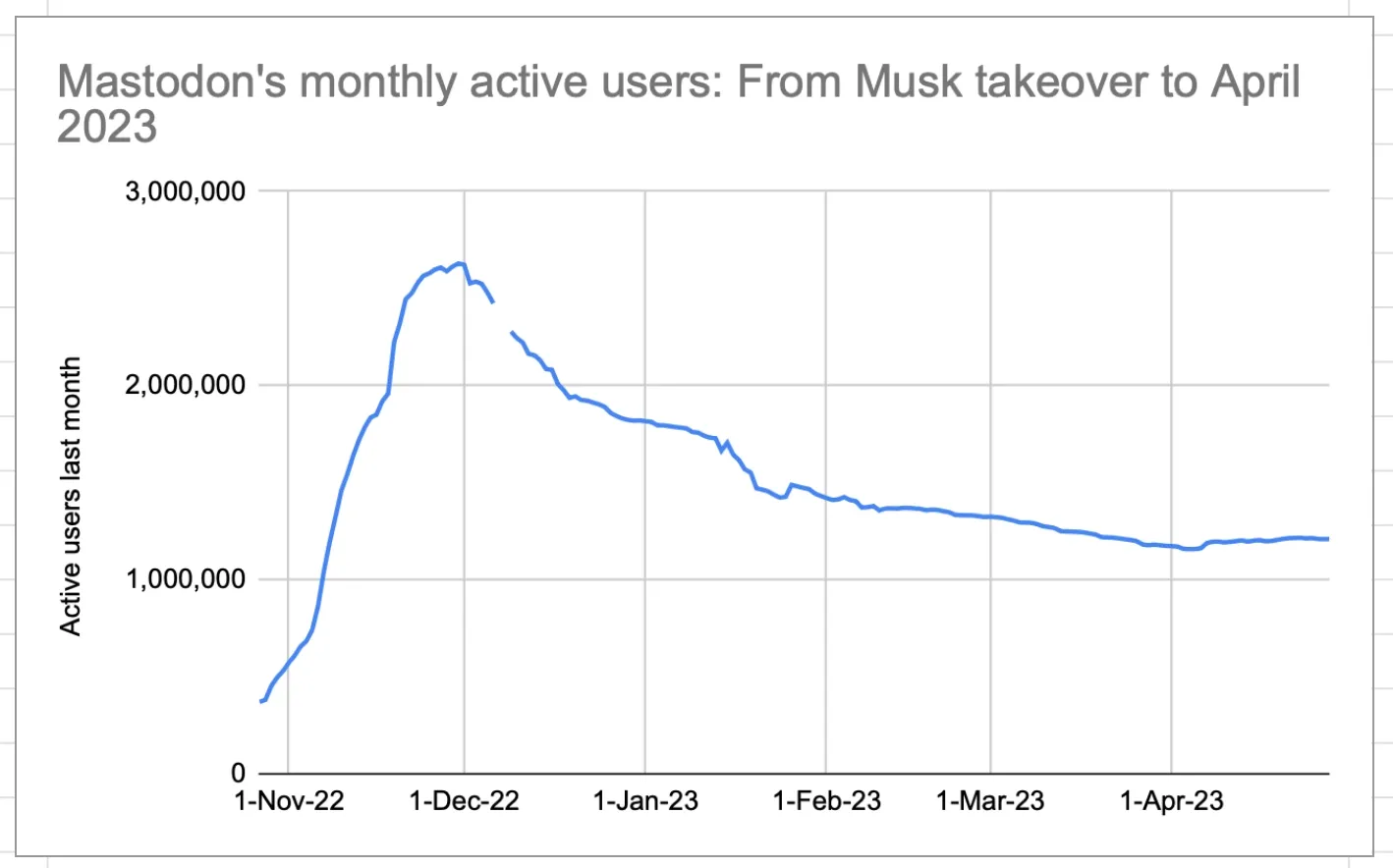
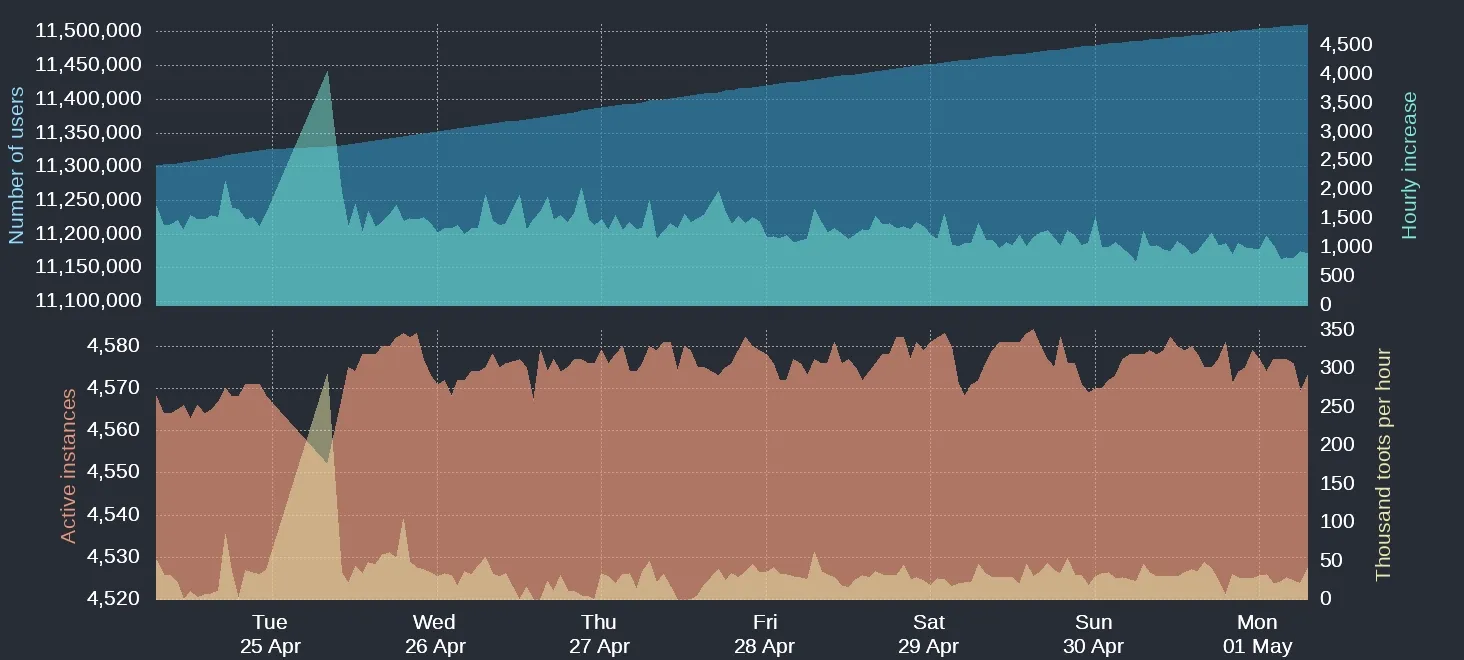
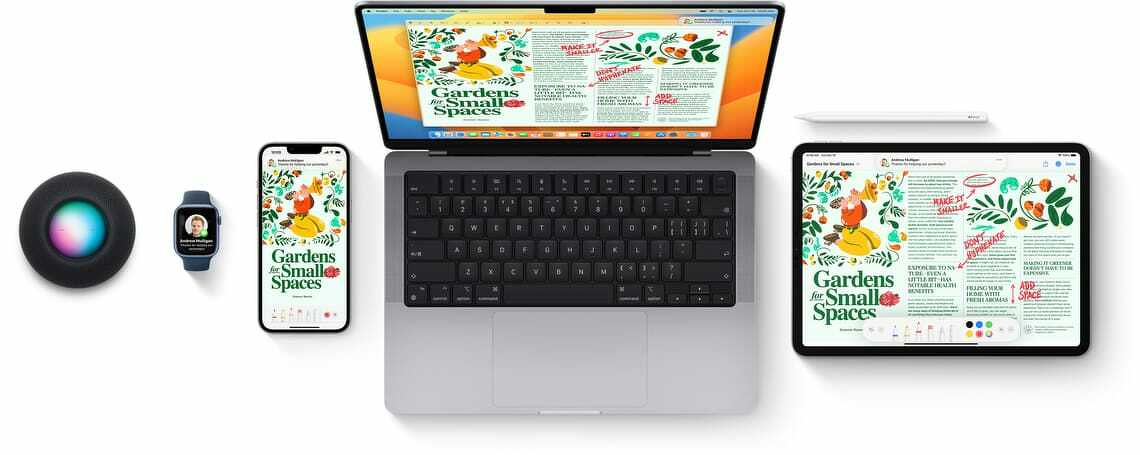
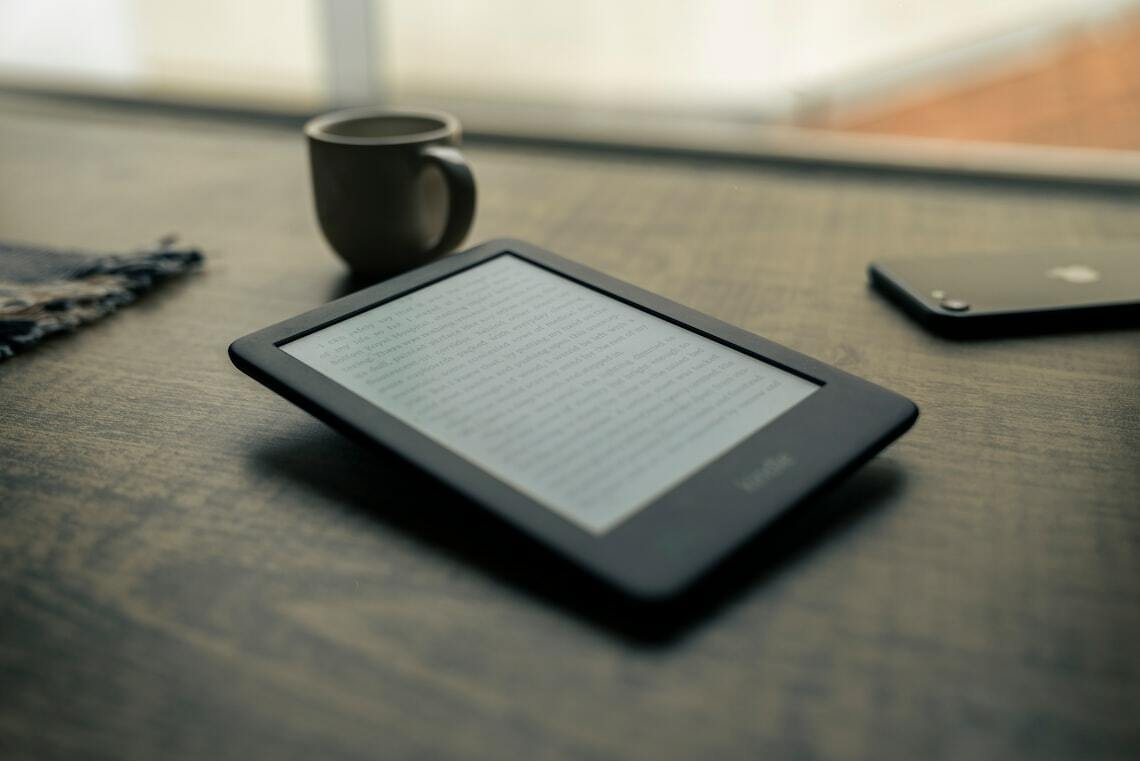 )
)