The 2025 MacBook Air M4 handles Logic Pro and other demanding apps with ease, making it a surprisingly capable choice at NZ$2400. This was originally posted in May 2025.
| Component | MacBook Air M4 (2025/2026) |
|---|---|
| Processor | Apple M4 (10-core CPU / 10-core GPU) |
| Base RAM | 16GB Unified Memory (Configurable to 32GB) |
| Display | 13.6" Liquid Retina (2560 x 1664), 500 nits |
| External Monitors | Up to 2 external displays (with lid open) |
| Webcam | 12MP Center Stage (with Desk View support) |
| Price (NZD) | From $2000 for a model with 16GB Ram, 256GB storage. |
Basics
Apple sent a review model 13-inch MacBook Air with 16GB of RAM and 512GB of storage. This configuration sells in New Zealand for $2400.
I used it as my daily work computer for four weeks. The biggest change isn’t raw performance, but how quietly and consistently it handles everyday work.
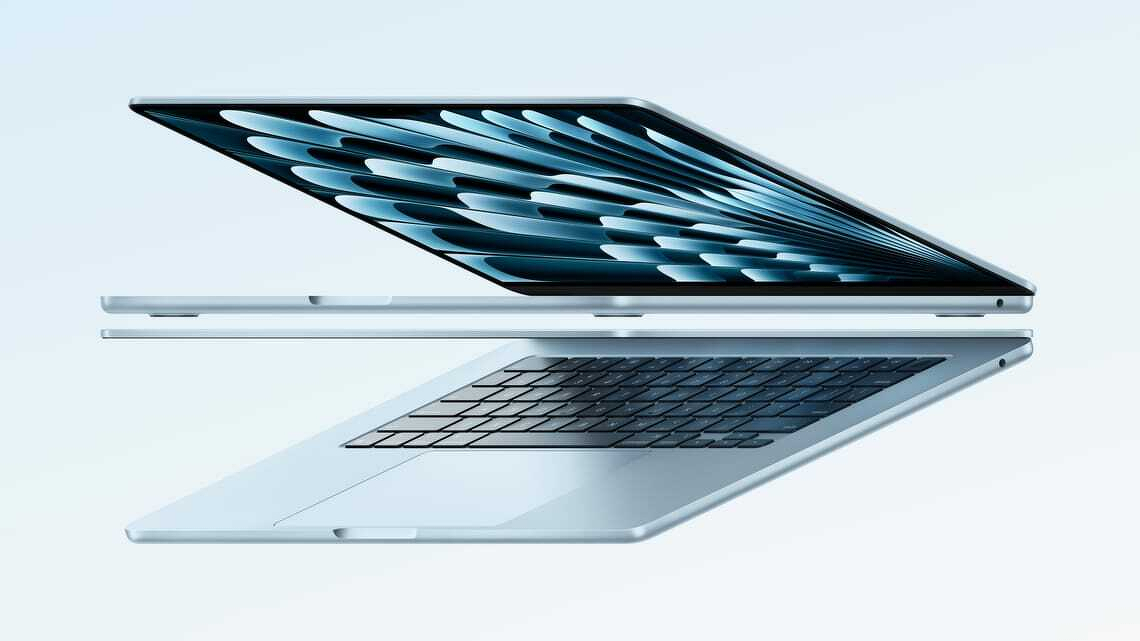
From the outside, it’s indistinguishable from the 2023 or 2024 models apart from the pale metallic finish. Apple calls this colour “sky blue”, replacing space grey.
Otherwise, nothing has changed. It’s thin, light and solidly built. The ports, screen, keyboard and trackpad are all carried over. There was nothing to fix.
Apple doesn’t mess with a formula that works.
Screen nit-picking
The 13-inch Liquid Retina display is excellent. At 2560 × 1664 pixels, text is crisp and colours are vivid. Photos and video both look great.
Apple sticks with a 60Hz refresh rate. MacBook Pro models offer 120Hz, which is smoother, but for most users it’s a nice-to-have rather than essential.
If you’re gaming at high frame rates or scrubbing video timelines all day, the Pro still makes more sense.
Fewer pixels than the MacBook Pro
The Air has fewer pixels than the MacBook Pro’s 3024 × 1964 display, and it’s slightly smaller at 13.6 inches versus 14.2 inches.
Brightness is also lower: 500 nits compared to the Pro’s 1000 nits sustained (1600 peak). On paper that sounds significant, but in practice the Air is bright enough for almost any job.
During testing I had cataract surgery. Beforehand I needed higher brightness, which hit battery life. Afterwards, I could turn it down. That’s not a typical benchmark, but it did underline how usable the display is across conditions.
If one screen isn’t enough, the M4 Air now supports two external displays while the lid remains open.

Keyboard, trackpad and ports
You’ll struggle to find a better laptop keyboard. As someone who types all day, I find the MacBook Air the best laptop for writing.
At the top right, the power button doubles as a Touch ID sensor. It’s fast, reliable and works for logins, passwords and payments.
Competitors come close on keyboards, but Apple’s trackpad remains unmatched. It’s precise, fluid and natural.
Ports are unchanged: MagSafe for charging, two USB-C ports and a headphone jack. Some complain about the lack of HDMI or Ethernet, but USB-C covers almost everything now.
Webcam and video calls
The upgraded 12MP webcam is a big improvement. Apple’s Center Stage keeps you framed and in focus during calls.
It works automatically. You don’t think about it, and that’s the point.
Apps like Zoom, Teams and FaceTime now feel like first-class experiences rather than compromises.
More computing power
If you’re upgrading from last year’s model, the performance bump is noticeable mainly in demanding apps.
Apple has doubled base memory to 16GB. Last year, that upgrade cost extra. Now it’s standard.
That matters. With 16GB you can comfortably run multiple apps at once. It’s the practical minimum for anything beyond basic office work.
Performance without noise
The M4 chip delivers strong performance without fan noise. The Air stays cool under normal use and only gets warm under sustained load.
I ran a demanding game in the background to stress the system. It became warm, not hot. For everyday work, it stays cool.
It won’t make you type faster, but it will render video, process images and handle 4K workloads without hesitation.
I tested it with Logic Pro and FL Studio. Even pushing towards the limits, there was still headroom.
Productivity: external displays
The ability to run two external monitors with the lid open is a meaningful upgrade.
With multiple screens, it’s easier to spread out research, documents and apps. It’s a genuine productivity boost, especially for writing or editing work.
Earlier Apple silicon Air models had limitations here. The M4 removes them.
Battery life
Apple claims up to 18 hours. In practice, I saw around 13 hours.
Higher screen brightness and external drives both reduce battery life. Even so, it’s enough for a full working day.
Long battery life has been a MacBook strength since Apple moved away from Intel.
Windows laptops have caught up in endurance, but often by trading performance. The M4 Air delivers both.
Running Logic Pro and other demanding apps
At $2000, this is Apple’s cheapest laptop. Yet it handles workloads that once required a MacBook Pro.
Logic Pro runs smoothly, even with large projects, multiple instruments and real-time effects. There’s no stuttering.
That’s a big change from Intel-era MacBook Air models, which struggled with even modest sessions.
The M4 handles advanced features, including AI tools, without breaking a sweat. I only found limits by deliberately overloading it.
FL Studio shows a similar story. Where older Air models hit limits quickly, the M4 runs cleanly and reliably.
Memory and storage options
The M4 MacBook Air supports up to 32GB of unified memory. That’s important for demanding workloads.
While 16GB is enough for most users, serious music or video work benefits from 32GB. It’s expensive, but it adds long-term headroom.
Storage is another constraint. The base model fills quickly if you work with media. Realistically, 1TB is a better starting point, with 2TB worth considering if budget allows.
A fully loaded 13-inch model reaches NZ$4400. The 15-inch version goes higher.

Verdict
You won’t find a better mix of performance, features and usability at this price.
It’s faster, more capable and now slightly cheaper than before. That’s rare.
The keyboard, trackpad and speakers remain best-in-class. Battery life is strong. Performance is more than enough for almost any task.
Upgrades are still expensive, but worthwhile if you need them.
Last year’s M3 MacBook Air was arguably the best all-round laptop available. The M4 version takes that title and strengthens it.
| M4 MacBook Air at a glance | |
|---|---|
| For: | M4 chip delivers huge amount of processing power at the price. Long battery life. Excellent screen, trackpad and keyboard. Great webcam. |
| Against: | Extra Ram or storage is expensive. No WiFi 7. |
| Maybe: | The pale blue case replacing ‘space grey’. |
| Verdict: | You won’t find a better combination of power and features at this price. MacBook Air remains a strong argument for leaving Windows. |
Frequently asked questions
Q: Does the MacBook Air M4 support two monitors? A: Yes, unlike previous models, the M4 Air supports two external displays while the laptop lid is open.
Q: Is the M4 MacBook Air good for music production? A: Yes. In my month of testing, it handled Logic Pro and FL Studio sessions that would have made older Intel models stutter.
Q: Is 16GB of Ram actually enough for professional audio in Logic Pro? A: Surprisingly, yes. While the 32GB upgrade offers more “future-proofing,” the new 16GB base configuration handles serious Logic Pro and FL Studio sessions with dozens of tracks and multiple real-time effects without stuttering. Because the M4’s unified memory is so fast, the “memory pressure” stays in the green for most home studio and mid-level professional projects. Only those working with massive orchestral sample libraries or high-end 4K video editing should feel the need to spend the extra $800 on the 32GB model.
