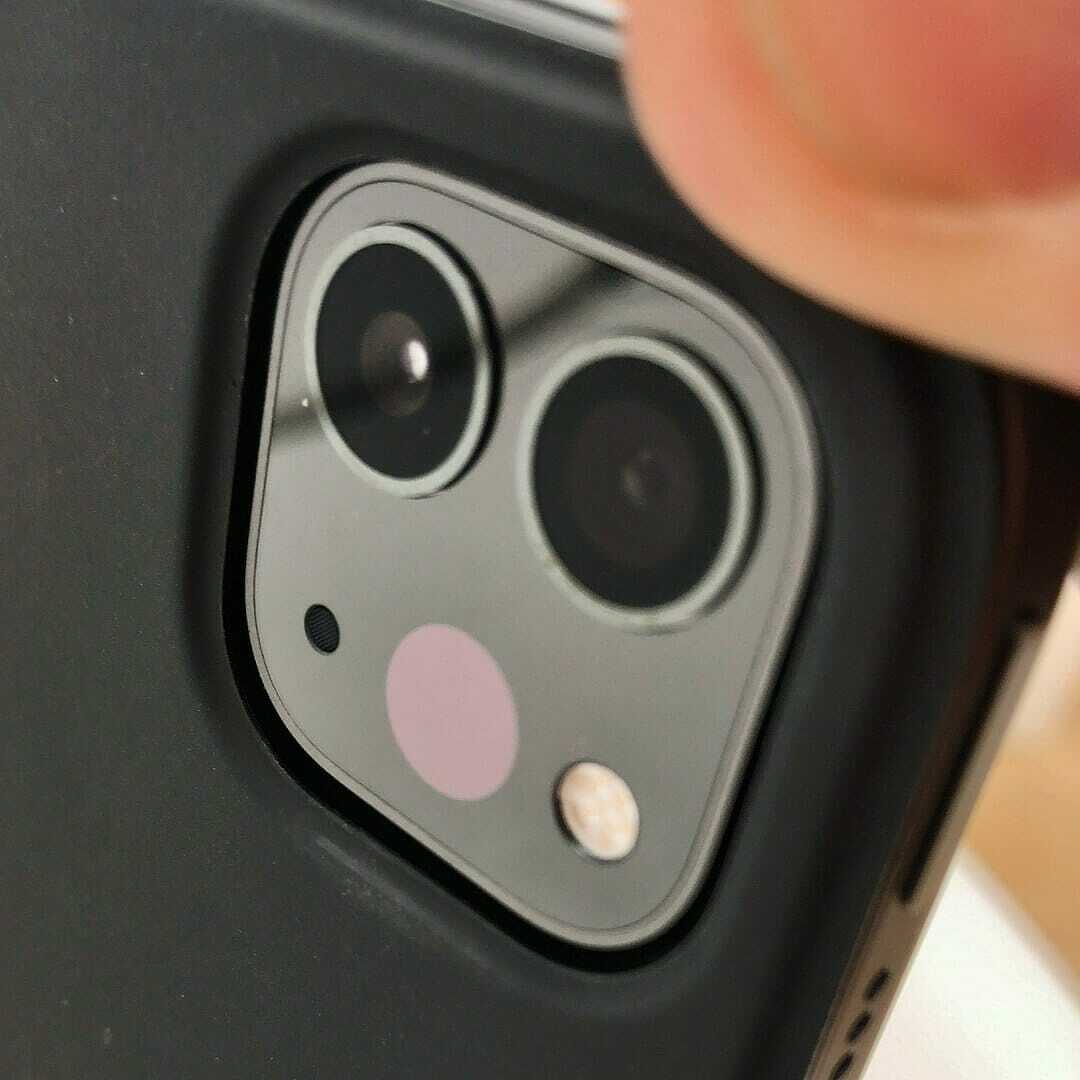
Apple iPad Pro 12.9-inch (2020) brings a modest speed bump, a revamped camera system and full mouse and trackpad support.
Apple’s 2020 iPad Pro 12.9-inch is a refinement, not a revolution. The big leap came in 2018 when Apple rebooted the Pro line. That model pushed the iPad closer to being a genuine laptop replacement while keeping the strengths of a tablet.
For everyday tasks like browsing or writing, there’s little difference.
The 2020 update builds on that solid base. Most hardware changes are incremental, but iPadOS has matured into a more capable platform for mobile computing.
Everything that made the 2018 model great remains. The design is still one of Apple’s best, with minimal bezels, squared edges and rounded corners. It feels so right that it’s hard to imagine a better approach.
Performance
Bionic chip
The new iPad Pro uses Apple’s A12Z Bionic processor. On paper it improves on the earlier A12X, but in practice the gains are modest. There are still eight cores, split between performance and efficiency.
For browsing, writing or streaming, there’s little noticeable change.
Push it harder and the difference shows. Graphics-heavy tasks like photo editing run faster, audio apps feel smoother and demanding workloads are more responsive. Even so, the improvement is incremental.
By today’s standards it remains fast. It can outperform a 2019 MacBook Air (2019) with an Intel Core i3, although it doesn’t challenge Apple’s high-end laptops.
Battery life
Battery life is slightly down on the 2018 model, which could stretch to 10–12 hours depending on workload. The 2020 version manages a little over nine hours in regular use.
That’s still enough for a full working day, though no longer exceptional. Heavy apps can drain the battery in around six hours, while lighter use will comfortably last longer.
Cameras
Apple has focused more on cameras than raw performance this time. The rear now includes two lenses and a LiDAR sensor, following the same direction as recent phone upgrades.
The main 12-megapixel wide camera is unchanged. It’s good for a tablet, though not on the level of the iPhone 11. The new 10-megapixel ultra-wide lens is a first for iPad and proves useful, especially in tighter spaces or low light. It often works alongside the main camera to improve results.
Using a 12.9-inch tablet as a camera still feels awkward. Holding a device this size for photography is unnatural, and the controls are less intuitive than on a phone. For consistent quality, dedicated cameras remain the better option. For quick snaps or document scanning, the iPad does the job well.
Front camera
The front-facing 7-megapixel camera is designed for selfies and video calls. This is where the iPad Pro excels. Video quality is far better than on most laptops I’ve used, whether Mac or Windows. For remote work, it makes a noticeable difference.
Placement is less ideal. In portrait mode the camera sits at the top, but with a keyboard attached in landscape it shifts to the side. Software compensates, yet eye contact can feel off. To appear engaged, you need to look towards the edge of the screen.
LiDAR sensor
The standout addition is the LiDAR sensor. While it may eventually improve photography, its main purpose is augmented reality.
LiDAR, used in autonomous vehicles, measures distance by mapping the surrounding environment. On the iPad it can scan rooms with surprising accuracy. Apple’s measuring app works up to around five metres, which is ideal indoors but less useful outside.
It also opens the door for AR apps and games, letting you place virtual objects convincingly in real spaces. For now it feels like a bonus feature, but that could change as developers explore its potential.
Verdict: 2020 12.9-inch iPad Pro
The 2020 iPad Pro 12.9-inch is an incremental update to an already excellent device. The design remains outstanding, performance is strong and iPadOS continues to improve.
New cameras and LiDAR add interest, but they are not compelling reasons to upgrade from the 2018 model. Battery life is slightly weaker, though still solid.
If you’re coming from an older iPad or want a tablet that can double as a serious work machine, this is an easy recommendation. If you already own the 2018 version, you can afford to wait.
